> ## Documentation Index
> Fetch the complete documentation index at: https://qodex.ai/docs/llms.txt
> Use this file to discover all available pages before exploring further.
# Autopilot
> Autopilot agents keep testing between your chats and raise everything they do or need as task cards you can approve, answer, or discuss with your team.
# Autopilot
Autopilot is how Qodex works between your sessions, not just during them.
Autopilot agents run on their own: on a schedule, when a bug is opened, or when you press **Run now**. Everything they do or need from you lands as a task card on the Autopilot board, so you stay in charge of what changes in your project.
Autopilot is in beta.
## Find Autopilot
Autopilot has its own section in the left navigation, with two rows:
| Row | What it shows |
| ---------- | -------------------------------------------------------------------------------------- |
| **Agents** | The agents this project has switched on or off, and the ready-made agents you can add. |
| **Tasks** | The board of task cards that agents and teammates raised. |
When tasks are waiting on you, the Autopilot section shows a count, even when the section is folded.
Both pages open with a weekly summary: runs, tests written, bugs reported, and how many tasks are waiting on you. Click the waiting count to jump to the Tasks board.
## Turn Autopilot on
Autopilot is switched on per project by the Qodex team. When it is off, the page header says **Autopilot is off. Qodex works only when you ask it to in chat.** Click **Book a call to enable** to set it up.
When Autopilot is on, Qodex tests continuously and raises tasks when it needs you. A daily email sums up the day and skips quiet days. A question that blocks a run is emailed right away.
## Agents
An agent is a standing job with its own instructions, trigger, and run history. Each agent is backed by a [mission](/docs/missions).
Open **Autopilot > Agents** to see:
* **Switched on**: agents that are running on their trigger.
* **Switched off**: agents you added and paused.
* **Add an agent**: ready-made agents this project has not added yet.
The recommended agent always appears first.
### Ready-made agents
| Agent | What it does | Default trigger |
| -------------------------------- | --------------------------------------------------------------------------------------------------------- | --------------------------------------------------------------------- |
| Auto-fix bugs | Reads the code behind an open bug and opens a pull request with a fix for a person to review. | Manual |
| API security sweep on a flow | Checks the endpoints one user flow calls against the OWASP API Top 10 and reports only what it can prove. | Manual |
| API security checks | Tests a collection's endpoints against the OWASP API Top 10 every night and proposes security tests. | Daily |
| Daily API tests | Writes and runs API tests for a collection every morning and keeps the ones that pass. | Daily |
| Explore for bugs | Uses the product like a patient tester every night and files the bugs it can reproduce. | Daily |
| Fill coverage gaps | Finds the endpoints in a collection that no test touches and writes tests for them. | Manual |
| Tests for new production errors | Watches your error tracker every hour and drafts a test for each error seen for the first time. | Hourly |
| Nightly regression | Replays a collection's saved tests every night and tells you what broke and what merely went stale. | Daily |
| Performance watch on an endpoint | Times one endpoint every night and flags it when it drifts slower than its baseline. | Daily |
| Replicate bugs on staging | Writes a test that shows each new bug on staging, runs it, and records whether the bug is really there. | When a critical, high, or medium bug is opened, at most 20 runs a day |
Scheduled triggers run in UTC.
Auto-fix bugs needs a linked repository, because it opens a pull request against your code. Only a project admin can add it. From a finding, **Fix in code** sends that bug to the Auto-fix agent, or takes you to the agent's card if it is not added or switched on yet.
Tests for new production errors needs an observability connector such as [Sentry](/docs/integrations-sentry).
### Add an agent
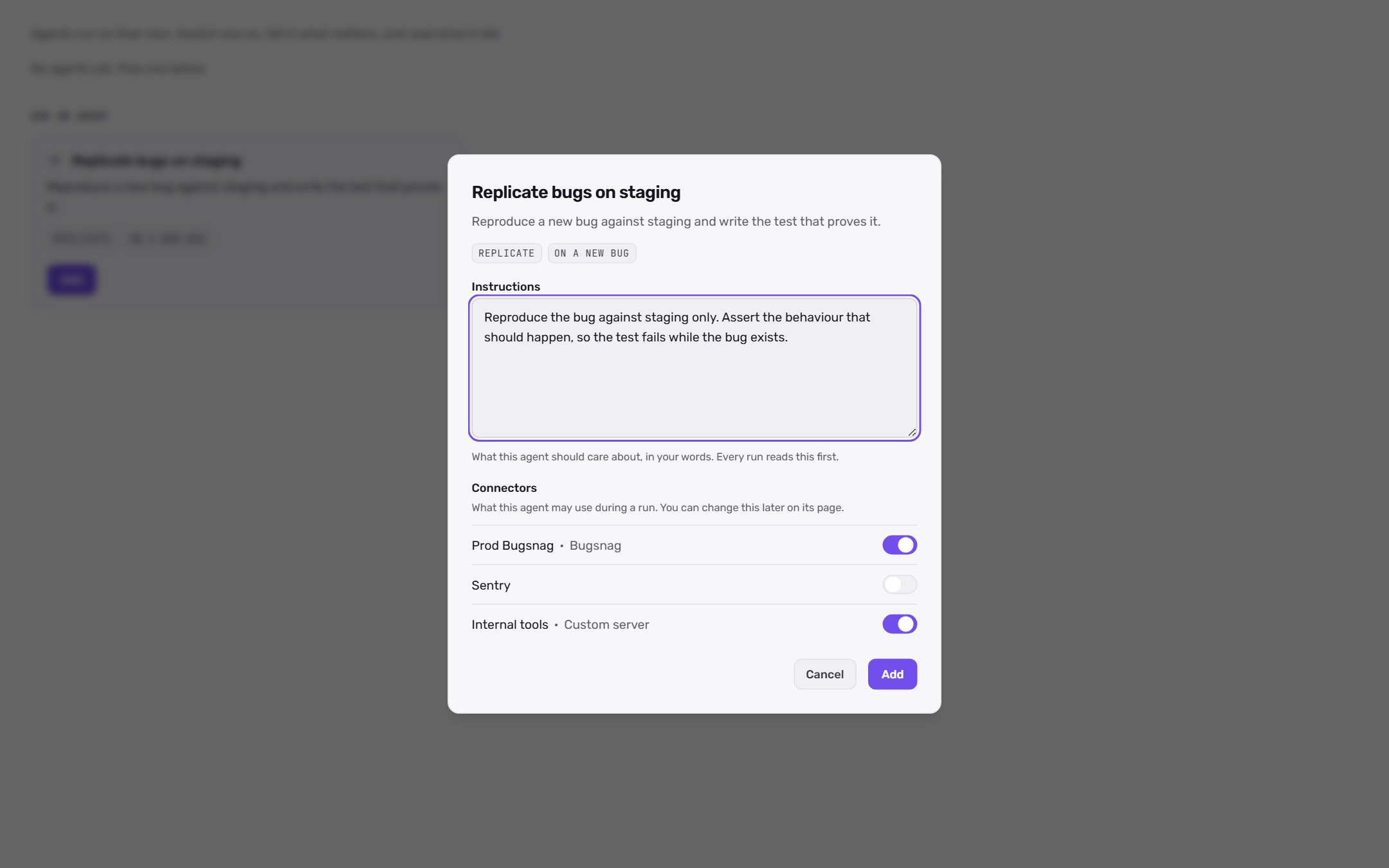
Open **Autopilot > Agents** and click **Add** on a ready-made agent under **Add an agent**.
Edit **Instructions**. Write what this agent should care about, in your own words. Every run reads this first.
Pick which connectors the agent may use during a run. You can change this later on the agent's page.
Click **Add**. The agent appears under **Switched on** and runs on its default trigger.
 ### Configure an agent
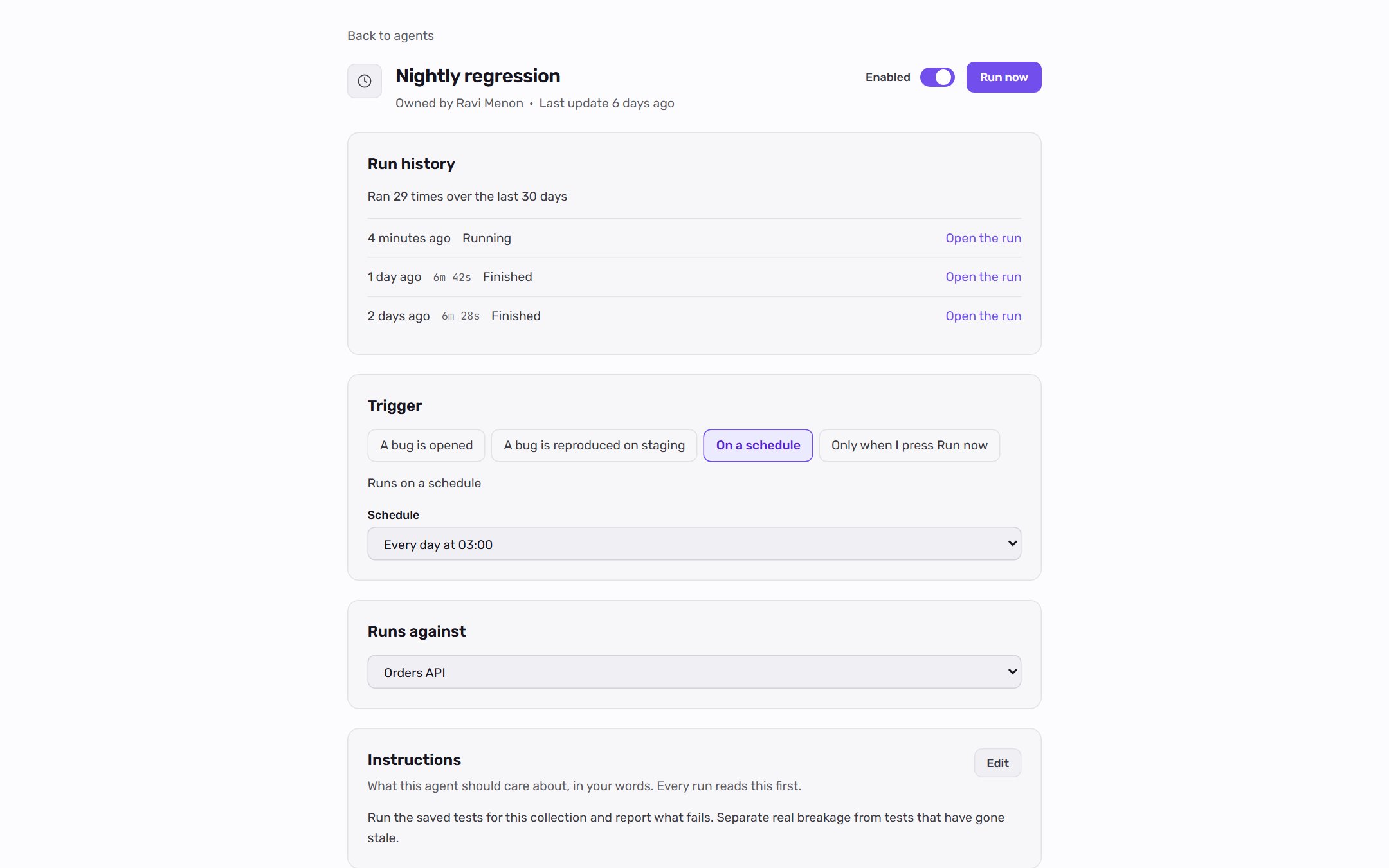
Click an agent to open its page. The page shows:
| Section | What you can change |
| ---------------- | ------------------------------------------------------------------------------------------------------------- |
| Header | The **Enabled** switch and **Run now**. The switch applies immediately. |
| **Run history** | Each run and its outcome, such as queued, running, finished, failed, or reproduced. |
| **Trigger** | **A bug is opened**, **A bug is reproduced on staging**, **On a schedule**, or **Only when I press Run now**. |
| **Instructions** | What the agent should care about. |
| **Runs against** | The endpoint, flow, or collection the agent works on, when it has one. |
| **Connectors** | Which connectors and which environment the agent may use during a run. |
Changes to the trigger, instructions, and connectors publish a new version of the agent when you click **Save**.
For bug triggers, choose which severities the agent answers under **Severity includes** and set **Runs a day, at most**. Schedules offer common times such as **Every hour** or **Every day at 02:00**, or a **Custom schedule** written as a five-field cron expression in UTC.
For an agent that answers bugs, **Run now** opens the list of bugs it could work on.
### Configure an agent
Click an agent to open its page. The page shows:
| Section | What you can change |
| ---------------- | ------------------------------------------------------------------------------------------------------------- |
| Header | The **Enabled** switch and **Run now**. The switch applies immediately. |
| **Run history** | Each run and its outcome, such as queued, running, finished, failed, or reproduced. |
| **Trigger** | **A bug is opened**, **A bug is reproduced on staging**, **On a schedule**, or **Only when I press Run now**. |
| **Instructions** | What the agent should care about. |
| **Runs against** | The endpoint, flow, or collection the agent works on, when it has one. |
| **Connectors** | Which connectors and which environment the agent may use during a run. |
Changes to the trigger, instructions, and connectors publish a new version of the agent when you click **Save**.
For bug triggers, choose which severities the agent answers under **Severity includes** and set **Runs a day, at most**. Schedules offer common times such as **Every hour** or **Every day at 02:00**, or a **Custom schedule** written as a five-field cron expression in UTC.
For an agent that answers bugs, **Run now** opens the list of bugs it could work on.
 ## Tasks
Open **Autopilot > Tasks** to see the board. Each column is one state:
| Column | Meaning |
| --------------- | ------------------------------------------------------------------------------- |
| **Needs input** | Waiting on a person: a question, a proposal to approve, or missing credentials. |
| **In queue** | Work that is about to start. |
| **In progress** | Work running now. |
| **Done** | Resolved tasks. |
| **Failed** | Work that did not pass. |
Each column loads the newest cards first. Click **Load more** to see older ones.
Click a card to open its thread in a side panel. Nothing on the board itself changes a task.
### Work with a card
* **Comment** in the thread. Type `@` to mention a project member.
* **Answer** a question in your own words when the agent asks for details.
* For "is this intended?" questions, choose **Yes, intended** or **No, that is a bug**. Yes records the behavior as a rule Qodex may cite from now on. No files the bug the agent was holding back.
* **Approve** or **Dismiss** a card with the shortcuts under the composer.
* For a proposal, tick the items you want and click **Approve selected**. Items left unticked are rejected, and the card closes.
* For a failed work task, click **Retry**.
### Follow a card
Mentioning someone, commenting, or deciding on a card makes you a watcher. Watchers get an email for every later comment, decision, or change on that card.
Click **Follow** on any card to get those emails, or **Unfollow** to stop them.
### Ask your team a question
Click **Ask a question** on the Tasks board to post your own question. You can attach it to the project, a collection, or a scenario. The question goes on the board with its own thread. Anyone on the project can answer, and the answer reaches the agent.
## Safety
Autonomy is governed:
* Generated tests start as drafts. A person promotes them to active.
* Agents run under strict budgets and a code-enforced safety envelope.
* Every action is auditable from its card or the agent's run history.
* Auto-fix opens a pull request for a person to review. It does not merge anything.
## Related
See the repeatable jobs behind each agent.
Connect an error tracker for production-error agents.
Review the bugs agents reproduce and fix.
See how Autopilot fits next to chat, schedules, and CI.
## Tasks
Open **Autopilot > Tasks** to see the board. Each column is one state:
| Column | Meaning |
| --------------- | ------------------------------------------------------------------------------- |
| **Needs input** | Waiting on a person: a question, a proposal to approve, or missing credentials. |
| **In queue** | Work that is about to start. |
| **In progress** | Work running now. |
| **Done** | Resolved tasks. |
| **Failed** | Work that did not pass. |
Each column loads the newest cards first. Click **Load more** to see older ones.
Click a card to open its thread in a side panel. Nothing on the board itself changes a task.
### Work with a card
* **Comment** in the thread. Type `@` to mention a project member.
* **Answer** a question in your own words when the agent asks for details.
* For "is this intended?" questions, choose **Yes, intended** or **No, that is a bug**. Yes records the behavior as a rule Qodex may cite from now on. No files the bug the agent was holding back.
* **Approve** or **Dismiss** a card with the shortcuts under the composer.
* For a proposal, tick the items you want and click **Approve selected**. Items left unticked are rejected, and the card closes.
* For a failed work task, click **Retry**.
### Follow a card
Mentioning someone, commenting, or deciding on a card makes you a watcher. Watchers get an email for every later comment, decision, or change on that card.
Click **Follow** on any card to get those emails, or **Unfollow** to stop them.
### Ask your team a question
Click **Ask a question** on the Tasks board to post your own question. You can attach it to the project, a collection, or a scenario. The question goes on the board with its own thread. Anyone on the project can answer, and the answer reaches the agent.
## Safety
Autonomy is governed:
* Generated tests start as drafts. A person promotes them to active.
* Agents run under strict budgets and a code-enforced safety envelope.
* Every action is auditable from its card or the agent's run history.
* Auto-fix opens a pull request for a person to review. It does not merge anything.
## Related
See the repeatable jobs behind each agent.
Connect an error tracker for production-error agents.
Review the bugs agents reproduce and fix.
See how Autopilot fits next to chat, schedules, and CI.