What Is API Security Testing? Types, Process & Examples
API security testing checks a running API for weaknesses in authentication, authorization, input handling, resource limits, and business logic. It is one part of API security, and it complements API penetration testing by turning repeatable attack checks into regression tests. This guide covers the methods, the process, a worked example with real requests, OWASP API Security Top 10 coverage, how to pick tools, and where every deeper topic lives.
What is API security testing?
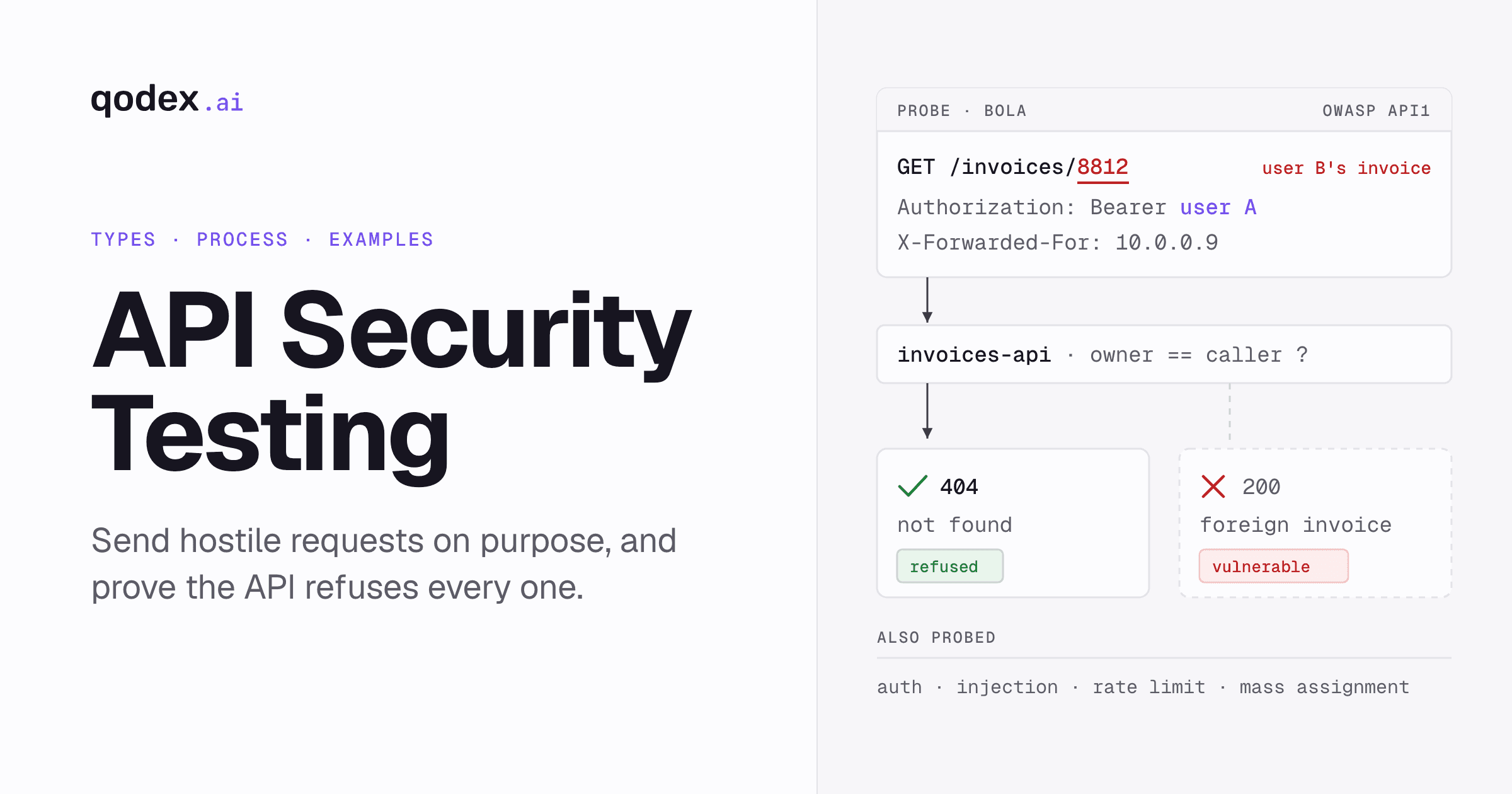
API security testing sends hostile requests at your API on purpose: foreign object IDs, tampered tokens, oversized payloads, injection strings. It proves the API refuses every one. It is a form of dynamic application security testing, or DAST, which means it exercises the running API rather than scanning source code, and it never stops at the happy path.
Said plainly, it is the practice of systematically testing your API endpoints for vulnerabilities, authentication bypasses, data exposure, injection attacks, and business logic flaws. The target is the deployed service, not the repository.
The quick answer:
What it tests: a running API, over the network, with real credentials.
What it looks for: access-control gaps, weak authentication, unvalidated input, unbounded resource use, leaked fields, and abusable flows.
What a pass means: the attack was blocked.
Where it sits: alongside functional, integration, and acceptance testing, not instead of them.
That last point about passing deserves its own line, because it trips people up. Security tests have the opposite shape from functional tests. A functional test passes when the request succeeds. A security test passes when the request is refused: the foreign invoice returns 404, the tampered token gets a 401, the injection string comes back inert. If you write security tests the way you write functional tests, you will write assertions that celebrate a data leak.
For the wider subject, including the controls that are not tests at all, start with API security 101.
What API security testing checks
The surface splits into ten areas. Each one has a different failure mode and a different test shape, and each has a deeper guide on this site.
| Area | What to test | Go deeper |
|---|---|---|
| Authentication | Missing, expired, tampered, wrongly signed, and cross-environment credentials against every protected endpoint. Protected routes must reject anything that merely looks like a JWT. | API authentication |
| Authorization and object access | Replace one user's object ID with another user's ID and require denial rather than foreign data. This is BOLA, also called IDOR. | OWASP API Top 10 |
| Function-level authorization | Call admin and internal endpoints with a regular-user token, including verb switching such as flipping a GET to a DELETE on the same route. | Broken function level authorization |
| Input validation and injection | Send values that break type, length, format, and range rules, and values designed to change the meaning of a query, a command, or an interpreter. Responses must come back inert and structured, not as a 500 with a stack trace. | SQL injection and its types |
| Rate limits and resource consumption | Push request rate, payload size, page size, CPU time, memory, queues, and downstream calls past what a normal client would use. | OWASP API Top 10 |
| Business logic | Repeat, reorder, and automate legitimate actions: redeem a coupon twice, complete a checkout out of order, drive a password reset at machine speed. | API security checklist |
| Data exposure | Ask whether the server returns only fields the caller may see. An API that returns too much data leaks it even when the client hides it, because an attacker calls the API directly. | Top API security vulnerabilities |
| Server side request forgery | Submit private addresses, loopback addresses, and cloud metadata endpoints to any parameter that takes a URL, and require rejection. | OWASP API Top 10 |
| Misconfiguration | Look for permissive CORS, verbose errors, debug routes, exposed documentation, unnecessary HTTP methods, and missing security headers. | OWASP API Top 10 |
| Dependencies | Inventory third-party libraries and check them against known vulnerabilities. Software composition analysis, or SCA, is the tool category that does this. | DevSecOps practices |
Identity is the part most teams get wrong first, because the standards are easy to half-implement. OAuth 2.0 is the industry standard for delegated authorization: an app, the client, gets limited and revocable access to another API, the resource server, without ever seeing the user's password. OpenID Connect adds an identity layer on top of OAuth and issues an ID token carrying user claims. OAuth answers what a caller may do; OIDC answers who the caller is. Test both, and read the mechanics in the OAuth 2.0 guide, the OpenID Connect guide, and the JWT guide.
Why APIs fail: common vulnerabilities
Most API breaches are not exotic. They are the same handful of missing checks, and each one has a recognisable symptom, attack, and fix.
| Weakness | What the attack looks like | The fix |
|---|---|---|
| Broken object level authorization | Changing /user/123 to /user/124 and getting somebody else's record back | Object-level ownership checks on every request, plus role-based access control |
| Broken function level authorization | Calling /admin/delete with a normal user's token | Role isolation and strict authorization per function, not per route prefix |
| Mass assignment | Adding "role":"admin" to a JSON body the client is allowed to send | Whitelist the parameters a caller may set, and ignore the rest |
| Excessive data exposure | An endpoint returning personally identifiable information the screen never shows | Filter responses on the server, and validate them against a schema |
| Injection | Input that changes the meaning of a query, command, or template | Parameterized queries, strict typing, and validation at the boundary |
| Server side request forgery | A URL parameter pointed at an internal service or a cloud metadata address | Allowlist outbound destinations, and refuse private and loopback ranges |
| Security misconfiguration | Exposed documentation, insecure defaults, unnecessary HTTP methods, missing headers, verbose errors | A deployment checklist that is enforced in CI, not remembered |
| Improper inventory management | A forgotten /v1 still serving traffic after /v2 shipped | An endpoint inventory that is diffed against the documented spec |
Data exposure is worth a second look, because it hides behind a working product. APIs that return too much data can inadvertently leak sensitive information. Even if client-side applications filter the data before displaying it, attackers can bypass these filters by directly accessing the API. The screen looks correct. The response body is the leak.
The full catalogue, with fixes for each entry, is in top API security vulnerabilities.
API security testing methods
Six methods cover the ground. They are not alternatives to each other. They see different things, at different moments, at different cost.
| Method | What it does | When it runs | What it misses |
|---|---|---|---|
| Static analysis (SAST) | Scans source code without running the application, looking for potential security issues | On commit, in the editor or CI | Anything that only exists at runtime, including authorization decisions |
| Dynamic analysis (DAST) | Runs the application and probes it from the outside, sending requests and reading responses | Against a deployed environment | Bugs that need valid credentials for two different users |
| Interactive analysis (IAST) | Instruments the running application, so it sees the code path behind each request | Alongside functional or dynamic tests | Anything outside the instrumented service |
| Software composition analysis (SCA) | Inventories third-party components and checks them against known vulnerabilities | On every dependency change | Flaws in your own code |
| Manual penetration testing | A human expert attacks the system, with permission, to find vulnerabilities that automated scans miss | Per engagement | Everything that changed after the engagement ended |
| Continuous security regression | Repeatable attack scenarios replayed like functional tests | Every release, nightly, or on a schedule | Novel attacks nobody has scripted yet |
Two techniques sit inside that list rather than beside it. Fuzzing feeds malformed, boundary, and random input to endpoints to find crashes and unhandled cases; it generates dynamic tests rather than forming a separate discipline. Contract checks compare live behaviour against the OpenAPI spec, which is how undocumented endpoints and drifted responses surface.
The choice that actually matters is DAST versus IAST, and the split is about visibility: outside-in probing, or instrumentation inside the running process. The tradeoffs are in IAST vs DAST. For the human side, see what is penetration testing, and for the outside-in tool market, DAST tools.
Recon, documentation and endpoint discovery
You cannot test an endpoint you do not know about, and the endpoints nobody documented are the ones nobody secured. Recon comes first, and it is mechanical work.
Build the inventory. Collect every route from the OpenAPI or Swagger spec, the Postman collection, the gateway configuration, the reverse-proxy rules, and the client code. Each source knows about routes the others forgot.
Diff the inventory against the spec. Diff the discovered endpoint inventory against the documented spec, then probe undocumented and versioned-but-forgotten endpoints, such as the /v1 left behind by /v2.
Probe the usual leftovers. Paths like /debug, /swagger, /graphql, and /actuator are frequently reachable in environments where nobody meant them to be.
Enumerate methods, not just paths. A route that correctly refuses DELETE for one role may accept PATCH from the same role.
Find the hidden parameters. Fields the client never sends, but the server still reads, are where mass assignment lives.
List the roles. Write down every role, and every pair of roles whose boundary matters. That list becomes your test matrix.
Recon is the part of the work that overlaps most with a manual engagement. If you want the full attacker workflow, read what is penetration testing.
The API security testing process
Nine steps, in order. Each one produces something the next one needs.
Scope. Name the services, environments, and data in play, and write down what is explicitly out of bounds.
Environment. Point aggressive tests at staging. Keep production read-only unless you have written permission and a rate cap.
Test accounts. Create at least two accounts per role boundary, each owning its own records. Without a second account, half the test matrix is unreachable.
Auth profiles. Automate login for each role and extract the token programmatically, so a test run does not start with a manual copy and paste.
Baseline requests. Record the correct response for each endpoint and role. You cannot recognise a wrong answer without the right one.
Negative cases. Write the hostile version of each baseline: the foreign ID, the missing token, the oversized body, the injected string.
Execution. Run the whole matrix, capture the full request and response for every case, and keep the artefacts.
Triage. Separate real findings from noise, rank by what an attacker actually gains, and attach the evidence to each one.
Remediation and retest. Fix, retest, and then keep the test. A fixed bug that is not covered by a test is a bug you will ship again.
Step nine is the one teams skip, and the one that compounds. Every fixed vulnerability that stays in the suite is a regression that cannot come back quietly.
API security checklist
Use this as the short version of the process. Five groups, each of which should be green before a release.
Authentication: protected endpoints reject missing, expired, tampered, and cross-environment tokens; login endpoints are rate limited; tokens are invalidated on logout and password change.
Authorization: object ownership is checked on every request; admin and internal functions refuse regular roles; alternate HTTP methods on the same route are covered.
Input validation: type, length, format, and range are enforced server-side; injection payloads return inert, structured errors; oversized bodies are rejected rather than parsed.
Data protection: responses carry only the fields the caller may see; transport is encrypted; errors do not include stack traces or internal identifiers.
Rate limiting: request rate, payload size, page size, and expensive operations are all bounded, and the limits are tested rather than assumed.
The twelve-step version, with implementation detail for each item, is the API security checklist every developer should follow.
One runnable test: BOLA across two users
Broken object level authorization is the most common API vulnerability and the one scanners miss most reliably, because finding it requires two authenticated sessions. You cannot find an IDOR with one set of credentials. The bug is, by definition, about what user B can do with user A's data, so the test has to authenticate as both and cross the streams.
Here is the whole test. The host, the users, the tokens, and the invoices are fixtures.
Fixture. User A owns invoice inv_8412. User B owns invoice inv_9931 and must not read User A's invoice. Both tokens are valid, which isolates authorization from authentication.
Request 1, establish User A's object.
GET /v1/invoices/inv_8412 HTTP/1.1
Host: api.example.com
Authorization: Bearer USER_A_TOKEN
Accept: application/json
The baseline response, expected and actual:
HTTP/1.1 200 OK
Content-Type: application/json

{
  "id": "inv_8412",
  "owner_id": "usr_a",
  "amount": 12900
}
Request 2, tamper with the object ID. Start from User B's own valid route, /v1/invoices/inv_9931, replace only the object ID with User A's inv_8412, and keep User B's valid token.
GET /v1/invoices/inv_8412 HTTP/1.1
Host: api.example.com
Authorization: Bearer USER_B_TOKEN
Accept: application/json
The secure response:
HTTP/1.1 403 Forbidden
Content-Type: application/json

{"error":"forbidden"}
The vulnerable response:
HTTP/1.1 200 OK
Content-Type: application/json

{
  "id": "inv_8412",
  "owner_id": "usr_a",
  "amount": 12900
}
The 200 is the failure. User B is authenticated, and the API accepted that as proof of ownership. This is broken object level authorization. Pass means the API returns 403 or 404; a 200 carrying foreign data files a finding.
Keep it as a regression test. This is the step that turns a one-off finding into permanent coverage. The assertion is tool-agnostic:
user_a_response = authenticated_get(USER_A_TOKEN, "/v1/invoices/inv_8412")
assert user_a_response.status == 200

cross_user_response = authenticated_get(USER_B_TOKEN, "/v1/invoices/inv_8412")
assert cross_user_response.status == 403
assert cross_user_response.body does not contain "inv_8412"
assert cross_user_response.body does not contain "usr_a"
Two details matter. The first assertion proves the fixture is real, so a broken test environment cannot make the second assertion pass by accident. And the body assertions matter as much as the status code, because an API that returns 403 with the record attached has still leaked it.
The fix is the same one every time: always verify that the authenticated user owns, or has permission to access, the requested resource. Never rely on client-supplied IDs alone. Two more worked cases follow the identical shape. For function-level authorization, call GET /admin/users and DELETE /admin/users/102 with a regular-user token, and require 403 from both. For server side request forgery, submit 169.254.169.254/latest/meta-data/ and localhost:6379 to any URL-fetching endpoint, and assert that both are blocked.
Every risk in the list below has a case like this one. The full set is in the OWASP API Security Top 10 guide.
OWASP API Security Top 10 coverage
The 2023 edition is the reference list the industry works from. One test and one fix per risk:
| Risk | One test | One fix |
|---|---|---|
| API1: Broken Object Level Authorization | Request objects owned by user A while authenticated as user B, across every object-bearing endpoint | Check object ownership on every request, not just at login |
| API2: Broken Authentication | Probe expired tokens, missing tokens, tampered signatures, and tokens from other environments | Validate signature, issuer, audience, and expiry on every protected route |
| API3: Broken Object Property Level Authorization | Send writes containing fields the role should not control, such as role, is_admin, or price, and read responses for fields it should not see | Whitelist writable properties and filter response fields server-side |
| API4: Unrestricted Resource Consumption | Request oversized page sizes, deep pagination, and repeated expensive operations | Enforce rate limits, payload caps, and bounded responses |
| API5: Broken Function Level Authorization | Call admin and internal endpoints with non-admin credentials, including verb switching on the same route | Authorize per function and per method, with role isolation |
| API6: Unrestricted Access to Sensitive Business Flows | Drive checkout, signup, and password reset at machine speed and out of order | Add anti-automation controls and server-side state checks |
| API7: Server Side Request Forgery | Submit internal addresses and cloud metadata endpoints to any URL-accepting parameter | Allowlist outbound destinations and refuse private ranges |
| API8: Security Misconfiguration | Check for verbose errors, stack traces, permissive CORS, missing security headers, and enabled debug endpoints | Enforce a deployment baseline in CI rather than by convention |
| API9: Improper Inventory Management | Diff the discovered endpoint inventory against the documented spec, and probe forgotten versions | Keep one authoritative inventory and retire old versions on a date |
| API10: Unsafe Consumption of APIs | Feed malformed and malicious upstream responses to anything that ingests third-party data | Validate at the consumption boundary, not only at the client boundary |
The list is a floor, not a ceiling. It covers the risks common enough to generalise, which is exactly why it says nothing about the business logic specific to your product. Read the full guide for the detail behind each row: OWASP API Security Top 10.
API penetration testing, automated testing, and continuous testing
These three get used interchangeably and they are not the same thing. A penetration test is an engagement: a human expert attacks your system for a fixed window and writes a report. API security testing is a practice: attack scenarios run continuously against your endpoints, the same way functional tests do. Automated scanning sits between them, and it is the weakest of the three at the risk that matters most.
| Dimension | Manual penetration test | Automated scanning | Continuous regression |
|---|---|---|---|
| Cadence | Per engagement | When someone remembers to run it | Every release, or on the schedule you set |
| Who finds the bug | A human expert, for a fixed window | A scanner running canned checks | Scenarios authored once, replayed on every change |
| BOLA and IDOR coverage | Yes, if the tester logs in as two users | Usually missed, because most scanners never authenticate twice | Built in, when the suite carries multiple auth profiles |
| Exposure window | Until the next engagement | Until the next ad-hoc run | One release cycle |
| Regression detection | Only if the next engagement retests it | Only if the same scan is rerun unchanged | Automatic, because every fixed bug stays tested |
| Novel attacks | Its main strength | None | None |
The right answer is not one of the three. It is continuous regression underneath, so nothing already known comes back, plus a human engagement for the attacks nobody has scripted. Scanning alone is the option that reads as coverage and is not. Background on the human side: what is penetration testing.
API security testing tools
Tools split into five categories, and most teams need more than one. Naming the category first saves you from comparing a fuzzer against a vulnerability manager.
API security scanners: crawl or import your endpoints and run a library of checks against them.
DAST tools: probe the running application from the outside, historically web-first, increasingly API-aware.
Interception proxies: put a human in the request path for manual exploration and replay.
Fuzzers: generate malformed and boundary input at volume to find unhandled cases.
Continuous testing platforms: keep attack scenarios in the same suite as functional tests and replay them on a schedule.
Five criteria separate the ones that stick from the ones that get uninstalled after a quarter.
Protocol support: REST, GraphQL, gRPC, and whatever else you actually ship. A tool that only speaks REST will silently skip half your surface.
False-positive noise: the ratio of findings that turn out to be real. Noise is not an inconvenience; it is what makes a team stop reading the report.
Remediation evidence: whether each finding arrives with the request and response that produced it. Without evidence, triage becomes a second investigation.
Lifecycle fit: whether it runs in CI on every change, or only as a scheduled scan somebody has to remember.
Workflow integration: whether findings reach the tracker, the pull request, and the on-call channel without a human retyping them.
For product-by-product comparisons, this site keeps four roundups: best API security testing tools for the category overall, Burp Suite and its alternatives for interception and manual work, Rapid7 alternatives for vulnerability management, and Escape alternatives for API-specific security platforms.
How to evaluate an API vulnerability scanner
Evaluate a scanner on your own API, not the vendor's demo target.
Give it credentials, then check what changed. An unauthenticated scan of an authenticated API tests the login page. If the finding count barely moves once you add a token, the tool is not reaching your logic.
Give it two sets of credentials. Then look for a single object-level authorization finding. Most scanners cannot produce one, and that is the number one API risk.
Plant a known bug. Put a real BOLA, a real injection point, and a real verbose error in a staging build, and count how many it finds.
Read ten findings end to end. Count how many are real, and how many carry a reproducible request. That ratio is the whole product.
Rerun it unchanged. Findings that come and go between identical runs get ignored within a month.
Scanner-by-scanner comparisons are in the vulnerability scanning tools roundup.
API security best practices
Seven practices, in the order they pay off.
Test on every change, not before releases. Security testing should be automated and run on every code change, not just before releases. A quarterly scan tells you what was true a quarter ago.
Design authorization per object, not per route. Route-level checks answer whether a caller may use an endpoint. Object-level checks answer whether they may touch this record. Most breaches live in the gap.
Ask for the narrowest scopes you need. Users or admins consent to those exact permissions. For long-lived access, request a refresh token only when necessary, and rotate it.
Validate input at the boundary. Type, length, format, and range, enforced server-side, before the value reaches a query or an interpreter.
Bound every resource. Request rate, payload size, page size, and expensive operations all need a ceiling, and the ceiling needs a test.
Encrypt in transit and manage the keys. Transport security is the easy half; certificate and key rotation is the half that expires quietly.
Keep every fixed bug as a test. This is what makes the practice compound instead of repeat.
Shift-left is a workflow change, not a tool purchase: threat modelling at design, dependency and secret scanning on commit, security scenarios in CI, scheduled runs against staging. The dedicated guides are 15 API security best practices, top 10 DevSecOps practices, API authentication best practices, and API encryption.
API security topic directory
Everything this guide summarises has a longer home. Twenty-eight guides and tools, grouped by what you are trying to do.
Fundamentals and workflow
API security 101: defines API security, its main threats, and the controls that apply across the lifecycle.
API security checklist: a developer checklist for authentication, authorization, inputs, data, inventory, monitoring, and incident response.
15 API security best practices: gateway policy, identity, encryption, rate limits, and CI/CD security gates.
API penetration testing: how to scope, run and report an API pen test, with a runnable BOLA check.
Top 10 DevSecOps practices: how teams move security checks into design, development, CI, deployment, and operations.
API security trends: the annual changes in API attack patterns and defensive practices.
API security posture management: the program that turns discovery, testing, and gateway evidence into an inventory, a risk backlog, verified fixes, and drift checks.
API security architecture: where each control lives, from gateway and OAuth to mTLS, rate limits, schemas, secrets and logs, four reference patterns, and the test that proves each block.
JWT decoder: decode a token, check expiry and claims, and verify HS256, RS256 or ES256 signatures in the browser.
Identity and access
What is API authentication: the authentication methods available and how credentials establish caller identity.
API authentication best practices: token handling, rotation, least privilege, and protecting the authentication endpoints themselves.
JWT explained: token structure, signing, validation, expiry, and the implementation mistakes that keep recurring.
What is OAuth 2.0: delegated authorization, the roles, the flows, scopes, and token use.
What is OpenID Connect: the identity layer on top of OAuth, and what ID tokens and user claims are for.
Broken function level authorization: how regular users reach privileged API functions, and how to test the role boundary.
Vulnerabilities and defenses
OWASP API Security Top 10: the 2023 risk list with a test and a fix for each item.
Top API security vulnerabilities: the broader vulnerability catalogue and how to close each entry.
SQL injection and its types: injection forms, example payloads, and defenses such as parameterized queries.
API encryption: transport encryption, mutual TLS, certificate handling, and key management.
Fintech cybersecurity challenges: authentication, data protection, fraud, compliance, and API risk applied to financial systems.
API security monitoring: what to log, six signals worth an alert, a runnable failed-authentication query, and how a production finding becomes a pull-request test.
Tools and comparisons
Best API security testing tools: API security scanners, dynamic tools, fuzzers, and testing platforms compared.
Top DAST tools: dynamic application security testing tools that probe running applications and APIs.
Vulnerability scanning tools: scanners compared, including the ones worth pointing at an API.
Burp Suite alternatives: what Burp Suite does, and how the manual and automated alternatives compare.
Rapid7 alternatives: alternatives compared by scanning, vulnerability management, application security, and API testing.
Escape alternatives: seven API security tools for teams evaluating a replacement.
IAST vs DAST: testing from inside a running application versus outside-in dynamic scanning.
How Qodex applies this process
Qodex runs this loop as part of a regression suite rather than a separate scan. Environments carry multiple auth profiles, for example an admin, a regular user, and a viewer, each with its own credentials, so cross-user checks like the BOLA test above are ordinary scenarios. The agent authors the attack scenarios, runs them, and replays saved ones deterministically on every change.
Two behaviours follow from the inverted semantics. A pass means the attack was blocked, and the agent will not resolve a failing security test by weakening its assertion, which is the cheapest and worst available fix. High and critical findings require captured evidence, the request and response that produced them, before they are filed.
See how Qodex security testing works.
Frequently Asked Questions
What is API security testing?
API security testing sends hostile requests at a running API on purpose, such as foreign object IDs, tampered tokens, oversized payloads, and injection strings, and checks that every one is rejected. It is a form of dynamic application security testing, so it exercises the deployed service rather than scanning source code. Its main value is the bugs that need authentication and context to find, above all broken object level authorization.
How is API security testing different from application security testing?
Application security testing assumes a browser client and a rendered page, so much of it targets the UI layer: cross-site scripting, session handling, form input. An API has no UI to hide behind. Every field the server accepts is directly reachable, every field it returns is directly readable, and client-side filtering does nothing. The overlap is real, but an application scan pointed at an API misses the authorization bugs that make up most API risk.
What is the difference between API security testing and penetration testing?
A penetration test is an engagement: a human expert attacks your system for a fixed window and writes a report. API security testing is a practice: attack scenarios run continuously against your endpoints, the same way functional tests do. They complement each other. A pentest brings human creativity for novel attacks; continuous testing makes sure the bugs it already found never come back.
Who owns API security testing, developers or QA?
Both, at different points. Developers own the checks that run on commit and in CI, because those must be fast and belong next to the code that changed. QA owns the scenario suite, the test accounts, and the role matrix, because those are test artefacts that need maintaining. Security reviews findings and sets the bar. The failure mode is each group assuming the other has it covered.
How often should you run API security tests?
Run the automated suite on every code change, and on a schedule against staging. Security testing should be automated and run on every code change, not just before releases, because an API changes far more often than a release calendar suggests. Anything that only runs before a release leaves an exposure window as long as the gap between releases.
Can penetration testing be automated?
The repetitive part of it, yes. Authorization probing, injection payloads, fuzzing, and OWASP API Top 10 checks are mechanical and repeatable, so they can be scripted once and replayed forever. What does not automate is creative chaining and reasoning about business logic, which is why a human engagement still earns its place. The useful model is automated and continuous underneath, with a human focused on the attacks a scripted scenario will never invent.
Does the OWASP API Security Top 10 cover everything?
No, and it does not claim to. It covers the risks common enough to generalise, which makes it the right starting point and the wrong finishing point. It says nothing about the business logic specific to your product: the coupon redeemed twice, the workflow step skipped, the refund issued to a different account. Those need tests somebody writes by understanding your domain.
How do you choose an API security testing tool?
Start from the category you need, then judge on five things: protocol support for what you actually ship, false-positive noise, whether findings arrive with the request and response that produced them, whether it runs in CI or only on a schedule, and whether findings reach your tracker without retyping. Evaluate on your own API with real credentials, because an unauthenticated scan of an authenticated API mostly tests the login page.
What is BOLA, and how is it different from IDOR?
They describe the same bug from two angles. IDOR, insecure direct object reference, is the classic name: an attacker changes an ID in a request and reads someone else's data. BOLA, broken object level authorization, is the OWASP API Security Top 10 framing: the API fails to check object ownership on the request. It has been the number one API risk in both editions of the OWASP API Top 10, because it is trivial to exploit and invisible to any scanner that never authenticates as two different users.