REST API Testing: The Complete Guide for Developers
Introduction
REST (Representational State Transfer) APIs are the backbone of modern web and mobile applications. From fetching user profiles to processing payments, nearly every application communicates with backend services through RESTful API endpoints. Testing these APIs is critical to ensuring reliability, performance, and security.
To run the REST checks below without maintaining the harness yourself, the Qodex API testing platform generates and replays the scenarios for you.
This guide covers everything you need to know about REST API testing, from the fundamentals of HTTP methods to advanced automation strategies. Whether you are a developer writing your first API test or a QA engineer building a comprehensive test suite, you will find practical techniques and code examples you can use immediately.
What Is REST API Testing?

REST API testing is the process of validating RESTful web services to ensure they return correct responses, handle errors gracefully, perform within acceptable limits, and remain secure against attacks.
Unlike UI testing (which tests what users see), API testing verifies the business logic layer directly, making it faster, more reliable, and easier to automate.
What You Test in a REST API
- HTTP status codes, Is the API returning 200, 201, 400, 401, 404, 500 correctly?
- Response body, Does the JSON/XML match the expected schema and values?
- Headers, Are content-type, cache-control, and CORS headers correct?
- Authentication, Do protected endpoints reject unauthorized requests?
- Performance, How fast does the API respond under normal and heavy load?
- Error handling, Does the API return meaningful error messages?
HTTP Methods and What to Test
REST APIs use standard HTTP methods. Each method has specific testing requirements:
GET, Retrieve Resources
# Fetch a single user
curl -X GET https://api.example.com/users/1 \
  -H "Authorization: Bearer YOUR_TOKEN"

# Expected: 200 OK with user data
# Test: Verify response schema, field types, and values
Paste any command in this section into the curl converter to get the same request as JavaScript fetch, Python requests, Go, PHP cURL or a Playwright test.
Test checklist for GET:
- Returns 200 for existing resources
- Returns 404 for non-existent resources
- Pagination works correctly (limit, offset, cursor)
- Filtering and sorting return accurate results
- Response headers include proper caching directives
POST, Create Resources
# Create a new user
curl -X POST https://api.example.com/users \
  -H "Content-Type: application/json" \
  -H "Authorization: Bearer YOUR_TOKEN" \
  -d '{
    "name": "Jane Doe",
    "email": "jane@example.com",
    "role": "developer"
  }'

# Expected: 201 Created with the new resource
Test checklist for POST:
- Returns 201 with the created resource
- Validates required fields (returns 400 for missing fields)
- Rejects duplicate entries appropriately (409 Conflict)
- Sanitizes input to prevent injection attacks
- Returns the created resource ID in the response
PUT/PATCH, Update Resources
# Full update (PUT)
curl -X PUT https://api.example.com/users/1 \
  -H "Content-Type: application/json" \
  -d '{"name": "Jane Smith", "email": "jane.smith@example.com", "role": "lead"}'

# Partial update (PATCH)
curl -X PATCH https://api.example.com/users/1 \
  -H "Content-Type: application/json" \
  -d '{"role": "lead"}'
DELETE, Remove Resources
# Delete a user
curl -X DELETE https://api.example.com/users/1 \
  -H "Authorization: Bearer YOUR_TOKEN"

# Expected: 204 No Content or 200 OK
Setting Up Your First REST API Test Suite
Let us build a practical test suite using two popular approaches: JavaScript (Node.js) and Python.
JavaScript with Jest and Axios
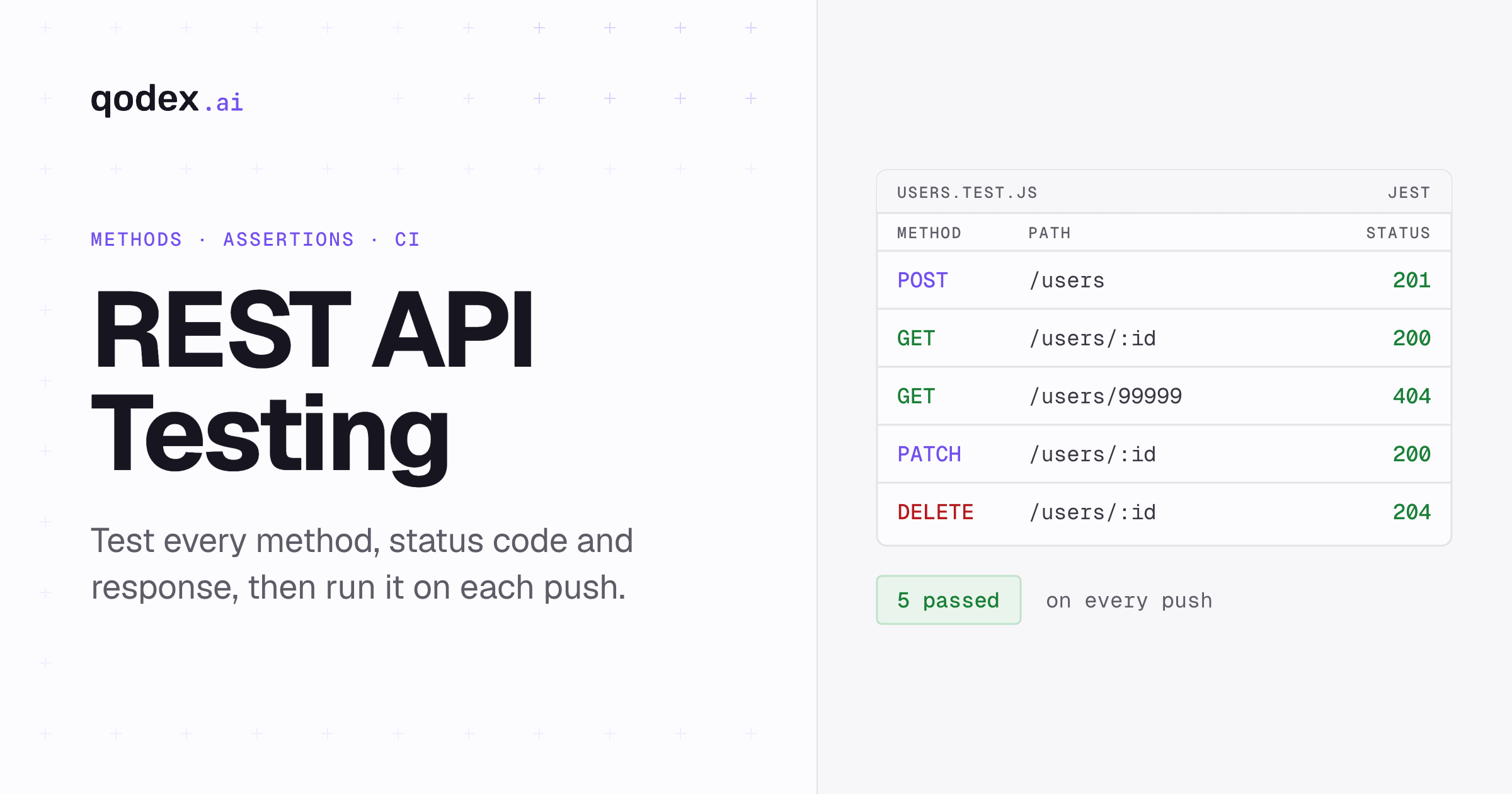
// tests/users.test.js
const axios = require('axios');

const API_URL = 'https://api.example.com';
const TOKEN = process.env.API_TOKEN;

const client = axios.create({
  baseURL: API_URL,
  headers: { Authorization: `Bearer ${TOKEN}` },
});

describe('Users API', () => {
  let createdUserId;

  test('POST /users creates a new user', async () => {
    const response = await client.post('/users', {
      name: 'Test User',
      email: 'test@example.com',
      role: 'developer',
    });

    expect(response.status).toBe(201);
    expect(response.data).toHaveProperty('id');
    expect(response.data.name).toBe('Test User');
    createdUserId = response.data.id;
  });

  test('GET /users/:id returns the created user', async () => {
    const response = await client.get(`/users/${createdUserId}`);

    expect(response.status).toBe(200);
    expect(response.data.email).toBe('test@example.com');
  });

  test('GET /users/:id returns 404 for non-existent user', async () => {
    try {
      await client.get('/users/99999');
    } catch (error) {
      expect(error.response.status).toBe(404);
    }
  });

  test('PATCH /users/:id updates user role', async () => {
    const response = await client.patch(`/users/${createdUserId}`, {
      role: 'lead',
    });
    expect(response.status).toBe(200);
    expect(response.data.role).toBe('lead');
  });

  test('DELETE /users/:id removes the user', async () => {
    const response = await client.delete(`/users/${createdUserId}`);
    expect(response.status).toBe(204);
  });
});
Python with pytest and requests
# tests/test_users.py
import os
import pytest
import requests

API_URL = "https://api.example.com"
HEADERS = {
    "Authorization": f"Bearer {os.environ['API_TOKEN']}",
    "Content-Type": "application/json",
}

class TestUsersAPI:
    created_user_id = None

    def test_create_user(self):
        response = requests.post(
            f"{API_URL}/users",
            json={"name": "Test User", "email": "test@example.com", "role": "developer"},
            headers=HEADERS,
        )
        assert response.status_code == 201
        data = response.json()
        assert "id" in data
        TestUsersAPI.created_user_id = data["id"]

    def test_get_user(self):
        response = requests.get(
            f"{API_URL}/users/{self.created_user_id}",
            headers=HEADERS,
        )
        assert response.status_code == 200
        assert response.json()["email"] == "test@example.com"

    def test_get_nonexistent_user(self):
        response = requests.get(f"{API_URL}/users/99999", headers=HEADERS)
        assert response.status_code == 404

    def test_delete_user(self):
        response = requests.delete(
            f"{API_URL}/users/{self.created_user_id}",
            headers=HEADERS,
        )
        assert response.status_code == 204
REST API Testing Best Practices
1. Test the Contract, Not the Implementation
Your tests should validate that the API adheres to its contract (schema, status codes, response format), not how the backend implements it internally. This makes tests resilient to refactoring.
2. Use Environment Variables for Configuration
Never hardcode API URLs, tokens, or credentials in your tests. Use environment variables or config files.
3. Implement Test Data Isolation
Each test should create its own data and clean up afterward. Never depend on pre-existing data that another test or user might modify.
4. Validate Response Schemas
Do not just check status codes, validate the entire response structure using JSON Schema validation:
const Ajv = require('ajv');
const ajv = new Ajv();

const userSchema = {
  type: 'object',
  required: ['id', 'name', 'email', 'role'],
  properties: {
    id: { type: 'integer' },
    name: { type: 'string' },
    email: { type: 'string', format: 'email' },
    role: { type: 'string', enum: ['developer', 'lead', 'admin'] },
  },
};

test('GET /users/:id matches schema', async () => {
  const response = await client.get('/users/1');
  const validate = ajv.compile(userSchema);
  expect(validate(response.data)).toBe(true);
});
5. Test Authentication and Authorization
- Request without token returns 401
- Request with expired token returns 401
- Request with insufficient permissions returns 403
- Request with valid token returns expected data
6. Test Error Responses
Error paths are just as important as happy paths. Verify that your API returns clear, consistent error messages with appropriate status codes.
7. Cover Edge Cases
- Empty request bodies
- Extremely long strings
- Special characters and Unicode
- Boundary values for numeric fields
- Null and undefined values
- Concurrent requests to the same resource
Automating REST API Tests in CI/CD
Manual API testing during development is a starting point, but production applications need automated tests running on every code change.
GitHub Actions Example
name: REST API Tests
on:
  push:
    branches: [main, develop]
  pull_request:
    branches: [main]

jobs:
  api-tests:
    runs-on: ubuntu-latest
    steps:
      - uses: actions/checkout@v4
      - uses: actions/setup-node@v4
        with:
          node-version: '20'
      - run: npm ci
      - run: npm run start:test &
      - run: npx wait-on http://localhost:3000/health
      - run: npm run test:api
        env:
          API_URL: http://localhost:3000
Automating with Qodex.ai
If you want to skip writing test code manually, Qodex.ai can analyze your API specification and automatically generate comprehensive test suites. The AI agent creates tests for happy paths, edge cases, error handling, and security vulnerabilities, then integrates into your CI/CD pipeline.
REST API Testing Tools Compared
For a detailed comparison, see our API testing tools comparison. Quick summary for REST testing:
| Tool | Language | Approach | Best For |
|---|---|---|---|
| Postman / Newman | JavaScript | GUI + CLI | Manual exploration + CI/CD |
| Qodex.ai | Any | AI-powered | Automated test generation |
| REST Assured | Java | Code | Java teams |
| pytest + requests | Python | Code | Python teams |
| Jest + axios | JavaScript | Code | Node.js teams |
| Karate DSL | Gherkin | BDD | BDD-style testing |
Advanced REST API Testing Techniques
Contract Testing
Contract testing ensures that the API provider and consumer agree on the API contract. Tools like Pact let you define consumer expectations and verify them against the provider. This is critical for integration testing in microservices.
Performance Testing
Use load testing tools like k6 or JMeter to verify your REST API handles expected traffic. Key metrics: p50/p95/p99 latency, throughput (RPS), error rate under load.
Security Testing
REST APIs are common attack targets. Test for vulnerabilities covered in the API security testing guide: SQL injection, broken authentication, excessive data exposure, rate limiting, and CORS misconfiguration.
REST vs Other API Architectures
REST is not the only option. Depending on your requirements, you might also consider GraphQL for flexible queries, gRPC for high-performance inter-service communication, or SOAP for enterprise systems with strict contracts.
Frequently Asked Questions
What is the difference between REST API testing and UI testing?
REST API testing validates the backend logic directly by sending HTTP requests and checking responses. UI testing interacts with the user interface through a browser. API tests are faster, more stable, and easier to automate because they skip the rendering layer.
How do I test a REST API without writing code?
Tools like Postman, Insomnia, and Hoppscotch provide visual interfaces for testing. Qodex.ai goes further by auto-generating test suites from your API specification, no coding required.
What should I test in a REST API?
At minimum: HTTP status codes, response body structure, authentication/authorization, error handling, input validation, and performance. See the API testing checklist for details.
How do I automate REST API testing?
Write tests using a framework like Jest, pytest, or REST Assured, then integrate into your CI/CD pipeline. Or use Qodex.ai to auto-generate and run tests.
What is the best tool for REST API testing?
It depends on your stack. For manual exploration, Postman or Insomnia. For automated code-based testing, REST Assured (Java) or pytest (Python). For AI-powered automation, Qodex.ai. See our full API testing tools comparison.
How does REST API testing differ from SOAP API testing?
REST uses JSON over HTTP while SOAP uses XML with strict WSDL schemas. REST testing is simpler since any HTTP client works. SOAP testing often requires specialized tools like SoapUI that understand WSDL and XML namespaces.