API Load Testing: Tools, Strategies & Best Practices
Introduction
Your API works perfectly in development. It passes all functional tests. Then you launch, traffic spikes, and everything falls apart, slow responses, timeouts, and 500 errors. This is the scenario API load testing is designed to prevent.
API load testing simulates real-world traffic patterns against your API endpoints to identify performance bottlenecks, determine capacity limits, and ensure reliability under stress. It answers the critical question: How will my API perform when thousands of users hit it simultaneously?
This guide covers load testing strategies, the best tools available, practical examples, and proven best practices for API testing at scale.
Why API Load Testing Matters
Functional tests verify that your API returns correct responses. Load tests verify that it does so under pressure. Here is what load testing reveals:
- Maximum throughput, How many requests per second can your API handle?
- Response time degradation, At what point do response times become unacceptable?
- Breaking point, When does the API start returning errors?
- Resource bottlenecks, Is CPU, memory, database connections, or network the limiting factor?
- Recovery behavior, Does the API recover gracefully after a traffic spike?
Real-World Impact
Amazon found that every 100ms of latency costs 1% in sales. Google discovered that a 0.5-second delay in search results caused a 20% drop in traffic. For APIs, the stakes are equally high, slow APIs mean slow applications, frustrated users, and lost revenue.
Types of API Load Tests

1. Baseline Test
Run with a single user (or very few) to establish baseline response times. This gives you a reference point for comparison.
2. Load Test
Simulate expected production traffic levels. For example, if you expect 1,000 concurrent users, test with 1,000 virtual users. Verify response times remain acceptable.
3. Stress Test
Push beyond expected traffic to find the breaking point. Gradually increase load until the API starts failing. This tells you your capacity ceiling.
4. Spike Test
Simulate sudden traffic surges, for example, a flash sale or viral event. Test how your API handles an abrupt jump from normal traffic to 10x or 50x normal.
5. Soak Test (Endurance Test)
Run moderate load for an extended period (hours or days) to uncover memory leaks, connection pool exhaustion, and other time-dependent issues.
6. Breakpoint Test
Incrementally increase load in steps, holding each level for a period, to find the exact point where performance degrades or the system fails.
Top API Load Testing Tools
k6 (Grafana Labs)
k6 is the developer favorite for API load testing. It uses JavaScript for test scripts, runs from the CLI, and integrates natively with CI/CD pipelines.
// k6-load-test.js
import http from 'k6/http';
import { check, sleep } from 'k6';

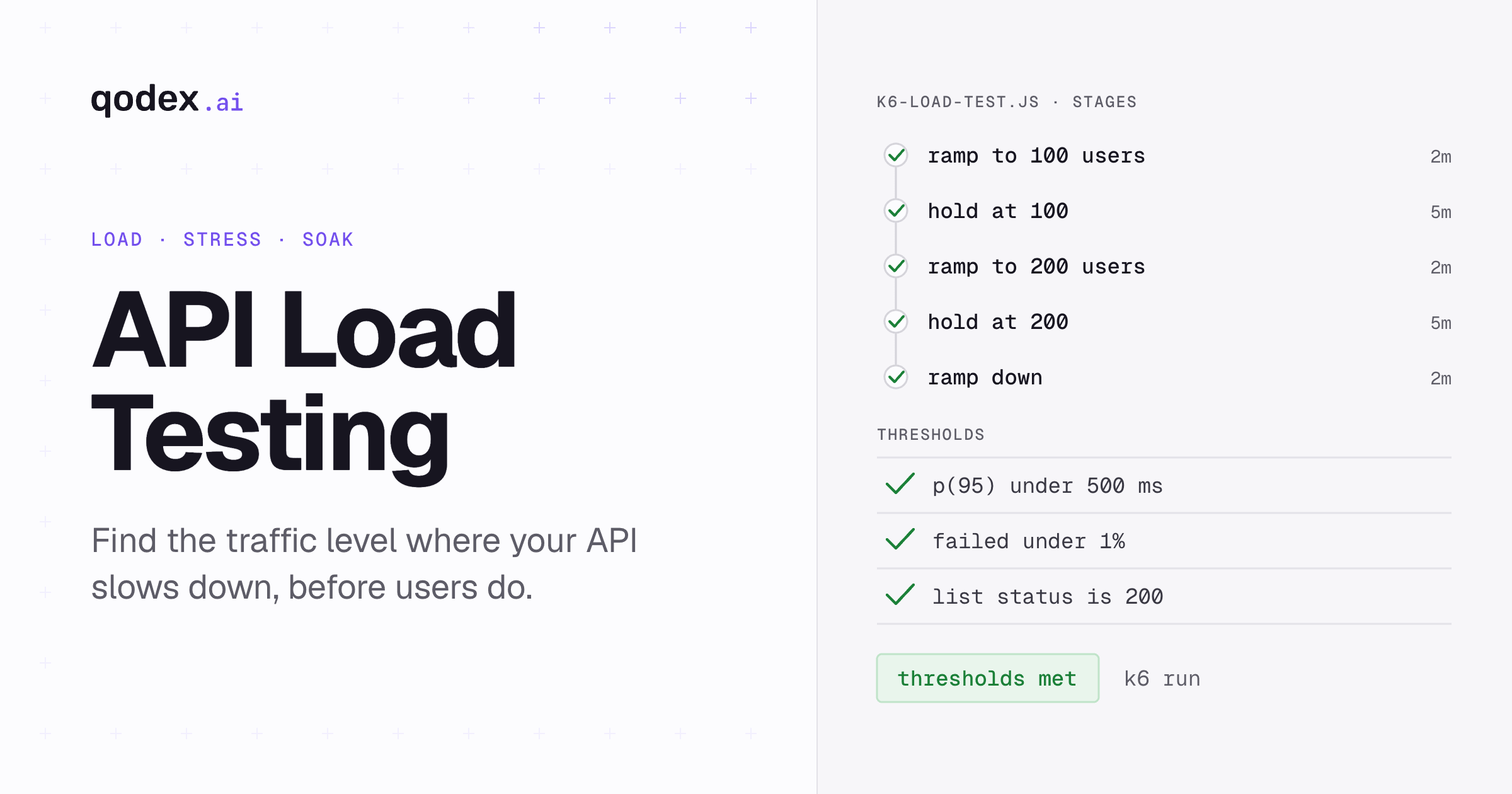
export const options = {
  stages: [
    { duration: '2m', target: 100 },   // Ramp up to 100 users
    { duration: '5m', target: 100 },   // Hold at 100 users
    { duration: '2m', target: 200 },   // Ramp up to 200 users
    { duration: '5m', target: 200 },   // Hold at 200 users
    { duration: '2m', target: 0 },     // Ramp down
  ],
  thresholds: {
    http_req_duration: ['p(95)<500'],   // 95% of requests under 500ms
    http_req_failed: ['rate<0.01'],     // Less than 1% failure rate
  },
};

export default function () {
  // Test GET endpoint
  const listRes = http.get('https://api.example.com/users');
  check(listRes, {
    'list status is 200': (r) => r.status === 200,
    'list response time < 500ms': (r) => r.timings.duration < 500,
  });

  // Test POST endpoint
  const payload = JSON.stringify({
    name: 'Load Test User',
    email: `user${Math.random()}@test.com`,
  });
  const createRes = http.post('https://api.example.com/users', payload, {
    headers: { 'Content-Type': 'application/json' },
  });
  check(createRes, {
    'create status is 201': (r) => r.status === 201,
  });

  sleep(1); // Think time between requests
}
Run the test:
k6 run k6-load-test.js
Why k6? Developer-friendly JavaScript scripting, lightweight CLI (no JVM), built-in metrics with thresholds, and native Grafana integration for dashboards.
Apache JMeter
JMeter is the enterprise standard for load testing. It supports a wide range of protocols and offers a GUI for building test plans.
# Run a JMeter test plan from CLI
jmeter -n -t api-load-test.jmx \
  -l results.jtl \
  -e -o report/

# Key parameters in test plan:
# Thread Group: 200 threads, 60 second ramp-up, loop 100
# HTTP Request: GET https://api.example.com/users
# Assertions: Response code = 200, Response time < 1000ms
Why JMeter? Protocol versatility (HTTP, JDBC, JMS, FTP), GUI for non-coders, distributed testing across multiple machines, and extensive plugin ecosystem. To build a JMeter API test plan step by step, from the first REST request through the non-GUI run and a CI gate, follow the hands-on guide.
Gatling
Gatling uses Scala-based DSL for creating load test scripts. It produces detailed HTML reports and handles high concurrency efficiently.
// Gatling simulation (Scala)
class ApiLoadTest extends Simulation {
  val httpProtocol = http
    .baseUrl("https://api.example.com")
    .acceptHeader("application/json")

  val scn = scenario("API Load Test")
    .exec(
      http("Get Users")
        .get("/users")
        .check(status.is(200))
        .check(responseTimeInMillis.lt(500))
    )
    .pause(1)
    .exec(
      http("Get Single User")
        .get("/users/1")
        .check(status.is(200))
        .check(jsonPath("$.name").exists)
    )

  setUp(
    scn.inject(
      rampUsers(200).during(120)  // 200 users over 2 minutes
    )
  ).protocols(httpProtocol)
   .assertions(
     global.responseTime.percentile3.lt(500),
     global.successfulRequests.percent.gt(99)
   )
}
Why Gatling? Excellent HTML reports, efficient async architecture, Scala DSL for expressive tests, and CI/CD-friendly CLI execution.
Locust (Python)
Locust lets you write load tests in plain Python. It is ideal for Python teams and offers a web-based UI for monitoring tests in real time.
# locustfile.py
from locust import HttpUser, task, between

class APIUser(HttpUser):
    wait_time = between(1, 3)  # 1-3 second think time

    @task(3)
    def get_users(self):
        self.client.get("/users", name="GET /users")

    @task(1)
    def create_user(self):
        self.client.post("/users", json={
            "name": "Load Test User",
            "email": f"user{id(self)}@test.com"
        }, name="POST /users")

    @task(2)
    def get_single_user(self):
        self.client.get("/users/1", name="GET /users/:id")
# Run Locust
locust -f locustfile.py --host=https://api.example.com \
  --users 200 --spawn-rate 10 --run-time 5m --headless
Why Locust? Pure Python (no DSL to learn), distributed testing built-in, real-time web dashboard, and easy to extend with custom logic.
Tool Comparison
| Tool | Language | GUI | Distributed | Reports | Best For |
|---|---|---|---|---|---|
| k6 | JavaScript | No | Cloud only | CLI + Grafana | Developer teams, CI/CD |
| JMeter | XML/GUI | Yes | Yes | HTML + plugins | Enterprise, protocol variety |
| Gatling | Scala | No | Enterprise | Excellent HTML | High-concurrency testing |
| Locust | Python | Web UI | Yes | Web dashboard | Python teams |
Load Testing Strategy: Step by Step
Step 1: Define Performance Requirements
Before writing a single test, define your performance SLAs:
- Response time targets, e.g., p95 < 500ms, p99 < 1s
- Throughput targets, e.g., 1,000 requests/second
- Error rate limits, e.g., < 0.1% under normal load
- Concurrent user targets, e.g., 5,000 simultaneous users
Step 2: Identify Critical API Endpoints
Not every endpoint needs load testing. Focus on:
- High-traffic endpoints (login, search, product listing)
- Data-intensive endpoints (reports, exports, aggregations)
- Payment and transaction endpoints
- Endpoints with database writes
Step 3: Create Realistic Test Scenarios
Your load tests should simulate real user behavior, not just hammer a single endpoint:
- Mix of read and write operations (typically 80/20 or 90/10)
- Realistic think times between requests (1-5 seconds)
- Varied request payloads (not identical data for every request)
- Proper authentication flows
Step 4: Run Tests in a Production-Like Environment
Load testing against your local machine or a scaled-down staging environment produces misleading results. Use an environment that matches production in terms of infrastructure, database size, and configuration.
Step 5: Monitor Everything
During load tests, monitor not just the API responses but also:
- Server CPU and memory usage
- Database query times and connection pool
- Network bandwidth and latency
- Queue depths and message processing rates
- Cache hit rates
Step 6: Analyze and Act on Results
Look for patterns in the results:
- Does response time increase linearly with load or exponentially?
- Which endpoints degrade first?
- Are errors concentrated on specific endpoints or distributed?
- Do you see resource exhaustion (CPU, memory, connections)?
Integrating Load Tests into CI/CD
Load testing should not be a one-time activity. Integrate it into your CI/CD pipeline to catch performance regressions early.
# GitHub Actions - k6 load test
name: API Load Tests
on:
  push:
    branches: [main]
  schedule:
    - cron: '0 2 * * 1'  # Weekly Monday 2 AM

jobs:
  load-test:
    runs-on: ubuntu-latest
    steps:
      - uses: actions/checkout@v4

      - name: Install k6
        run: |
          sudo gpg --no-default-keyring --keyring /usr/share/keyrings/k6-archive-keyring.gpg \
            --keyserver hkp://keyserver.ubuntu.com:80 --recv-keys C5AD17C747E3415A3642D57D77C6C491D6AC1D68
          echo "deb [signed-by=/usr/share/keyrings/k6-archive-keyring.gpg] https://dl.k6.io/deb stable main" \
            | sudo tee /etc/apt/sources.list.d/k6.list
          sudo apt-get update && sudo apt-get install k6

      - name: Run load test
        run: k6 run --out json=results.json load-tests/api-load.js

      - name: Check thresholds
        run: |
          if grep -q '"thresholds".*"fail"' results.json; then
            echo "Load test thresholds failed!"
            exit 1
          fi
Common API Performance Issues and Fixes
N+1 Query Problem
If your API endpoint makes one database query per item in a list, performance degrades linearly with data size. Fix: Use eager loading, batch queries, or data loaders.
Missing Database Indexes
Slow queries are the most common cause of API latency. Ensure indexes exist on columns used in WHERE, JOIN, and ORDER BY clauses.
No Caching
If your API fetches the same data repeatedly from the database, add caching layers: in-memory cache (Redis), HTTP cache headers, and CDN caching for static responses.
Connection Pool Exhaustion
Under load, your API might run out of database connections. Configure connection pools appropriately and add timeout handling.
Synchronous Operations
Long-running operations (email sending, file processing, report generation) should be moved to background job queues rather than blocking the API response.
Related: What is API Latency?
Combining Load Testing with Functional Testing
Load testing works best alongside functional API testing, security testing, and integration testing. Tools like Qodex.ai can automate your functional test suite while you use k6 or JMeter for load testing, giving you comprehensive coverage.
For a complete overview of available tools, see our API testing tools comparison.
Frequently Asked Questions
What is the difference between load testing and stress testing?
Load testing simulates expected production traffic to verify performance meets SLAs. Stress testing pushes beyond expected limits to find the breaking point. Both are important, load testing validates normal operations, and stress testing reveals how your system fails and recovers.
How many virtual users should I use in a load test?
Start with your expected peak concurrent users, then test at 2x and 5x that number. For example, if you expect 1,000 concurrent users at peak, test with 1,000, 2,000, and 5,000 virtual users to understand your capacity headroom.
How often should I run API load tests?
Run lightweight load tests (baseline + standard load) on every deployment. Run full stress tests and soak tests weekly or before major releases. Integrate tests into CI/CD so performance regressions are caught immediately.
Can I load test a REST API with Postman?
Postman recently added performance testing with their Collection Runner, but it is limited compared to dedicated tools. For serious load testing, use k6, JMeter, Gatling, or Locust, which are designed for generating high concurrent loads.
What metrics should I track during API load testing?
Track response time (p50, p95, p99), throughput (requests/second), error rate, and resource utilization (CPU, memory, DB connections). Set thresholds for each metric and fail the test if thresholds are breached.
How do I load test GraphQL APIs?
The same tools (k6, JMeter, Gatling) work for GraphQL APIs. Send POST requests to the GraphQL endpoint with query payloads. Be aware that GraphQL queries can vary widely in cost, test both simple queries and complex nested queries with multiple joins.