GraphQL vs REST API: Key Differences, Performance & When to Use Each
Introduction
The debate between GraphQL and REST has been one of the most discussed topics in API design since Facebook open-sourced GraphQL in 2015. Both are approaches to building APIs that enable clients to request data from servers, but they take fundamentally different approaches to how that data is requested and delivered.
Once you have picked an API style, the Qodex API testing platform can author and replay test scenarios against both REST and GraphQL endpoints.
REST (Representational State Transfer) has been the dominant API architecture for over two decades. It uses standard HTTP methods and resource-based URLs that map naturally to CRUD operations. GraphQL, created by Facebook, is a query language that gives clients the power to request exactly the data they need, no more, no less.
This comparison covers the core differences, performance characteristics, developer experience, and practical use cases to help you choose the right architecture for your project. We also include code examples for both approaches so you can see the differences firsthand.
How REST APIs Work
REST APIs expose resources through URLs and use HTTP methods to perform operations:
# GET a list of users
GET /api/users

# GET a specific user
GET /api/users/123

# GET a user's posts
GET /api/users/123/posts

# Create a user
POST /api/users
Content-Type: application/json
{"name": "Jane Doe", "email": "jane@example.com"}

# Update a user
PUT /api/users/123
Content-Type: application/json
{"name": "Jane Smith", "email": "jane@example.com"}

# Delete a user
DELETE /api/users/123
REST Response Example
// GET /api/users/123
{
  "id": 123,
  "name": "Jane Doe",
  "email": "jane@example.com",
  "avatar": "https://cdn.example.com/avatars/123.jpg",
  "role": "developer",
  "department": "Engineering",
  "createdAt": "2024-01-15T10:30:00Z",
  "lastLogin": "2025-02-20T14:22:00Z"
}
The client gets all fields, even if it only needs the name and email. This is called over-fetching.
How GraphQL Works
GraphQL uses a single endpoint and lets clients specify exactly what data they need through queries:
# All GraphQL requests go to a single endpoint
POST /graphql
Content-Type: application/json

# Query: Get user with only name and email
{
  "query": "{ user(id: 123) { name email } }"
}

# Response: Only the requested fields
{
  "data": {
    "user": {
      "name": "Jane Doe",
      "email": "jane@example.com"
    }
  }
}
GraphQL Schema Definition
# GraphQL schema (server-side)
type User {
  id: ID!
  name: String!
  email: String!
  avatar: String
  role: String!
  posts: [Post!]!
  department: Department
}

type Post {
  id: ID!
  title: String!
  content: String!
  author: User!
  comments: [Comment!]!
  createdAt: DateTime!
}

type Query {
  user(id: ID!): User
  users(limit: Int, offset: Int): [User!]!
  post(id: ID!): Post
}

type Mutation {
  createUser(input: CreateUserInput!): User!
  updateUser(id: ID!, input: UpdateUserInput!): User!
  deleteUser(id: ID!): Boolean!
}
Fetching Related Data in a Single Query
# Get user with their posts and each post's comments, ONE request
query {
  user(id: 123) {
    name
    email
    posts {
      title
      createdAt
      comments {
        text
        author { name }
      }
    }
  }
}
In REST, this would require 3 separate API calls (user, posts, comments for each post) or a custom endpoint. In GraphQL, it is one query.
Key Differences: GraphQL vs REST
1. Data Fetching
| Aspect | REST | GraphQL |
|---|---|---|
| Endpoints | Multiple (one per resource) | Single endpoint (/graphql) |
| Over-fetching | Common (returns all fields) | No (client specifies fields) |
| Under-fetching | Common (requires multiple calls) | No (nested queries) |
| Request format | HTTP method + URL path | Query language in POST body |
2. Performance
REST advantages:
- HTTP caching works natively (GET requests are cacheable by URL)
- CDN caching is straightforward
- Simpler responses = faster parsing
- No query complexity overhead
GraphQL advantages:
- Fewer network requests (fetch related data in one query)
- Less data transferred (no over-fetching)
- Mobile-friendly (lower bandwidth usage)
- Batched queries reduce round trips
3. Caching
REST: Native HTTP caching works out of the box. Each URL is a natural cache key. CDNs, browsers, and proxies understand HTTP cache headers.
# REST, easy to cache
GET /api/users/123
Cache-Control: max-age=3600
ETag: "abc123"
GraphQL: Caching is more complex because all requests go to the same URL via POST. You need application-level caching with tools like Apollo Client, Relay, or Persisted Queries.
// GraphQL, requires client-side caching
const client = new ApolloClient({
  cache: new InMemoryCache(),
  // Normalized caching by object type and ID
});
4. Error Handling
REST uses HTTP status codes (200, 400, 404, 500). GraphQL always returns 200 OK and puts errors in the response body:
// REST error, HTTP 404
// Status: 404 Not Found
{ "error": "User not found" }

// GraphQL error, HTTP 200 OK (always)
{
  "data": { "user": null },
  "errors": [{
    "message": "User not found",
    "path": ["user"],
    "extensions": { "code": "NOT_FOUND" }
  }]
}
5. Versioning
REST: Typically uses URL versioning (/api/v1/, /api/v2/). Breaking changes require a new version.
GraphQL: No versioning needed. Add new fields without breaking existing clients. Deprecate old fields with @deprecated directives. Clients only request the fields they use.
6. Developer Experience
REST: Widely understood, simple concepts, extensive tooling (API testing tools), massive ecosystem.
GraphQL: Strong typing, auto-generated documentation (GraphiQL/GraphQL Playground), introspection, IDE autocompletion for queries.
Code Comparison: Building the Same Feature
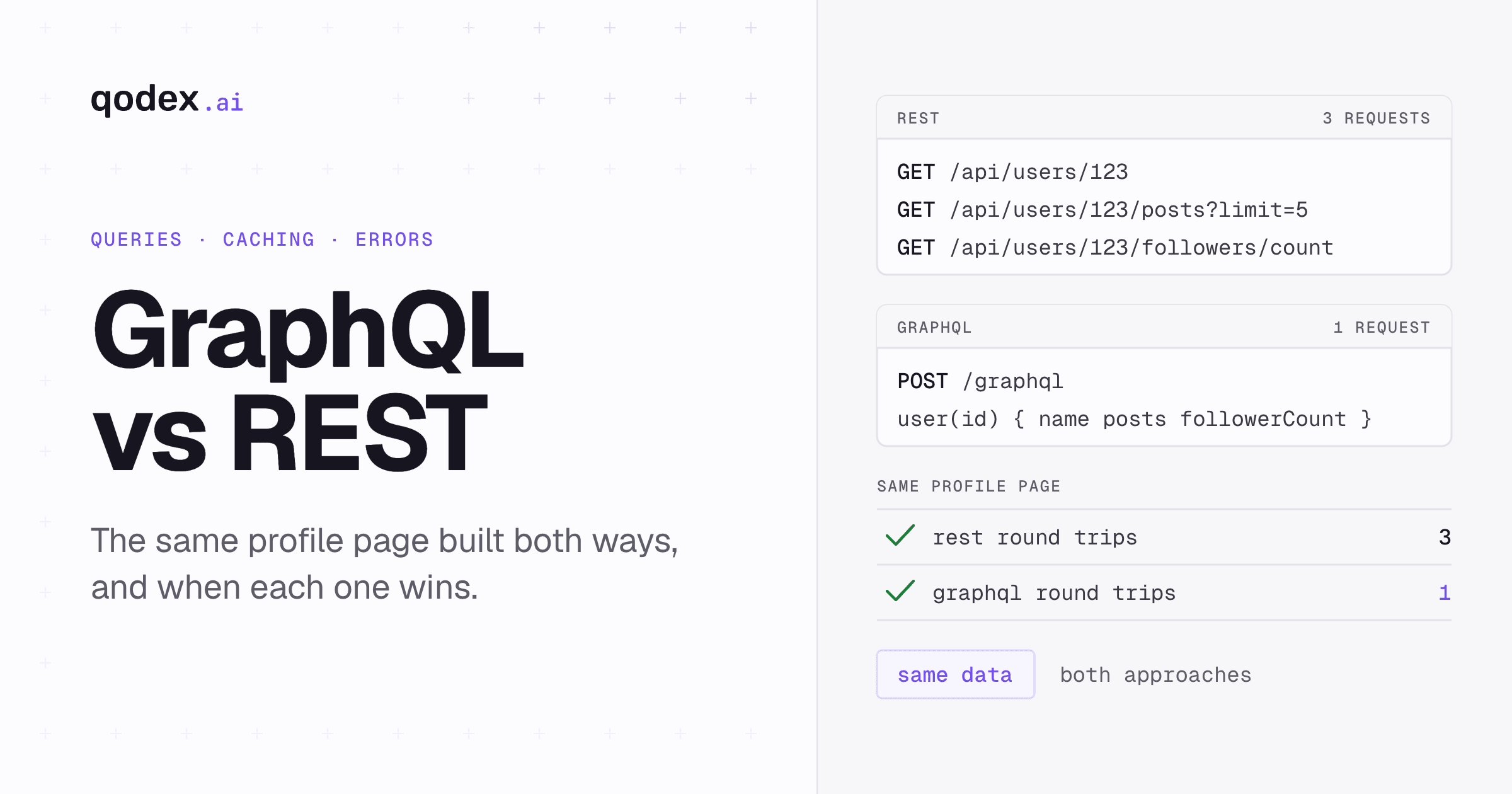
Let us build a user profile page that displays user info, recent posts, and follower count.
REST Implementation
// REST: 3 separate API calls
async function loadUserProfile(userId) {
  // Call 1: Get user data
  const userRes = await fetch(`/api/users/${userId}`);
  const user = await userRes.json();

  // Call 2: Get user's posts
  const postsRes = await fetch(`/api/users/${userId}/posts?limit=5`);
  const posts = await postsRes.json();

  // Call 3: Get follower count
  const followersRes = await fetch(`/api/users/${userId}/followers/count`);
  const followers = await followersRes.json();

  return { user, posts, followers: followers.count };
}
// 3 network round trips, potential over-fetching on each
GraphQL Implementation
// GraphQL: 1 API call with exactly the fields needed
async function loadUserProfile(userId) {
  const query = `
    query UserProfile($id: ID!) {
      user(id: $id) {
        name
        email
        avatar
        posts(limit: 5) {
          title
          createdAt
          commentCount
        }
        followerCount
      }
    }
  `;

  const res = await fetch('/graphql', {
    method: 'POST',
    headers: { 'Content-Type': 'application/json' },
    body: JSON.stringify({ query, variables: { id: userId } }),
  });
  const { data } = await res.json();
  return data.user;
}
// 1 network round trip, exactly the data needed
Testing GraphQL vs REST APIs
Both API styles need thorough testing, but the approaches differ:
Testing REST APIs
REST API testing is straightforward, test each endpoint with different HTTP methods, parameters, and payloads. See our complete REST API testing guide for details.
Testing GraphQL APIs
// Testing GraphQL with Jest
describe('GraphQL User Queries', () => {
  test('fetches user with selected fields', async () => {
    const query = `
      query { user(id: "1") { name email } }
    `;
    const res = await request(app)
      .post('/graphql')
      .send({ query })
      .expect(200);

    expect(res.body.data.user).toEqual({
      name: 'John Doe',
      email: 'john@example.com',
    });
    // Verify no extra fields returned
    expect(Object.keys(res.body.data.user)).toHaveLength(2);
  });

  test('handles nested queries', async () => {
    const query = `
      query {
        user(id: "1") {
          name
          posts(limit: 2) { title }
        }
      }
    `;
    const res = await request(app)
      .post('/graphql')
      .send({ query })
      .expect(200);

    expect(res.body.data.user.posts).toHaveLength(2);
  });

  test('returns error for non-existent user', async () => {
    const query = `query { user(id: "99999") { name } }`;
    const res = await request(app)
      .post('/graphql')
      .send({ query })
      .expect(200); // GraphQL always returns 200

    expect(res.body.errors).toBeDefined();
    expect(res.body.errors[0].message).toContain('not found');
  });
});
For automated test generation for both REST and GraphQL APIs, Qodex.ai can analyze your API specification and generate comprehensive test suites.
When to Use REST vs GraphQL
Choose REST When...
- You need simple CRUD operations with straightforward data models
- HTTP caching and CDN support are critical
- Your team is familiar with REST and needs to move fast
- You are building public APIs consumed by third parties
- Your API resources map cleanly to URL patterns
- You need to support file uploads natively
Choose GraphQL When...
- Clients need flexible, varying data requirements (mobile vs web vs TV)
- Your data model has many relationships (social networks, e-commerce catalogs)
- You want to reduce the number of network requests
- Frontend teams need autonomy to request data without backend changes
- You are aggregating data from multiple backend services
- You need real-time features (GraphQL subscriptions)
Use Both (Hybrid Approach)
Many organizations use REST for simple, cacheable, public endpoints and GraphQL for complex, internal, client-specific data requirements. This is not uncommon, GitHub offers both REST and GraphQL APIs.
GraphQL vs REST vs gRPC
For a complete comparison including gRPC, consider that gRPC excels in server-to-server communication with binary serialization (Protocol Buffers), while REST and GraphQL are better suited for client-to-server communication. And for enterprise systems with strict contracts, SOAP remains relevant.
| Aspect | REST | GraphQL | gRPC |
|---|---|---|---|
| Best for | CRUD, public APIs | Complex queries, mobile | Microservices, streaming |
| Data format | JSON (usually) | JSON | Protocol Buffers (binary) |
| Performance | Good | Good (less over-fetching) | Excellent (binary) |
| Caching | Excellent (HTTP native) | Complex (app-level) | Manual |
| Learning curve | Low | Medium | High |
| Browser support | Native | Via fetch/POST | Via grpc-web |
Frequently Asked Questions
What is the main difference between GraphQL and REST?
REST uses multiple endpoints (one per resource) with fixed response structures. GraphQL uses a single endpoint where clients specify exactly what data they need through a query language. REST may over-fetch or under-fetch data, while GraphQL returns precisely the requested fields.
Is GraphQL faster than REST?
It depends on the use case. GraphQL can be faster when it eliminates multiple round trips (fetching related data in one query) and reduces payload size (no over-fetching). REST can be faster for simple, cacheable requests because HTTP caching and CDNs work natively. For performance-critical applications, benchmark both approaches with your specific data patterns.
When should I use GraphQL vs REST API?
Use REST for simple CRUD operations, public APIs, and when HTTP caching is important. Use GraphQL when clients have varied data needs, your data has complex relationships, or you need to minimize network requests for mobile applications. Many teams use both, REST for simple endpoints and GraphQL for complex data requirements.
Can GraphQL replace REST completely?
Technically yes, but practically most organizations use them alongside each other. REST is simpler for straightforward resources and benefits from native HTTP caching. GraphQL shines for complex, nested data requirements. The choice should be driven by your specific needs, not dogma.
How do you test GraphQL APIs compared to REST APIs?
REST API tests target specific endpoints with HTTP methods (GET, POST, PUT, DELETE). GraphQL tests send queries/mutations to a single endpoint and validate the response structure. Both need testing for authentication, authorization, error handling, and performance. See our REST API testing guide for REST-specific techniques. Tools like Qodex.ai support both REST and GraphQL testing.
Why did Facebook create GraphQL?
Facebook created GraphQL in 2012 to solve the performance problems of their mobile app. The REST APIs were returning too much data (over-fetching) and required too many round trips to build complex views. GraphQL let mobile clients request exactly the data needed for each screen, reducing bandwidth usage and improving app performance. It was open-sourced in 2015.