SOAP vs REST API: Differences, Use Cases & When to Choose Each
Introduction
SOAP and REST are the two most established approaches to building web APIs. While REST has become the dominant choice for modern web and mobile applications, SOAP remains widely used in enterprise environments, particularly in banking, healthcare, telecommunications, and government systems.
Whichever protocol your service speaks, the Qodex API testing platform can author and replay HTTP scenarios against it.
Understanding the differences between SOAP and REST is essential whether you are designing a new API, integrating with legacy systems, or choosing the right API testing tools for your stack. This guide breaks down both approaches with practical code examples, performance comparisons, and clear guidance on when to use each.
What Is SOAP?

SOAP (Simple Object Access Protocol) is a protocol for exchanging structured information between services. It uses XML for all messages and follows a strict specification defined by W3C.
SOAP Message Structure
Every SOAP message has a specific XML envelope structure:
<?xml version="1.0" encoding="UTF-8"?>
<soap:Envelope
  xmlns:soap="http://www.w3.org/2003/05/soap-envelope"
  xmlns:usr="http://example.com/users">

  <soap:Header>
    <usr:AuthToken>Bearer abc123xyz</usr:AuthToken>
  </soap:Header>

  <soap:Body>
    <usr:GetUserRequest>
      <usr:UserId>123</usr:UserId>
    </usr:GetUserRequest>
  </soap:Body>

</soap:Envelope>
SOAP Response
<?xml version="1.0" encoding="UTF-8"?>
<soap:Envelope
  xmlns:soap="http://www.w3.org/2003/05/soap-envelope"
  xmlns:usr="http://example.com/users">

  <soap:Body>
    <usr:GetUserResponse>
      <usr:User>
        <usr:Id>123</usr:Id>
        <usr:Name>Jane Doe</usr:Name>
        <usr:Email>jane@example.com</usr:Email>
        <usr:Role>developer</usr:Role>
      </usr:User>
    </usr:GetUserResponse>
  </soap:Body>

</soap:Envelope>
WSDL (Web Services Description Language)
SOAP APIs are defined by a WSDL document, an XML file that describes every operation, message format, and data type the service supports. The WSDL acts as a strict contract between client and server.
What Is REST?

REST (Representational State Transfer) is an architectural style for building APIs. It uses standard HTTP methods, resource-based URLs, and typically JSON for data exchange.
REST Request Example
# GET a user
curl -X GET https://api.example.com/users/123 \
  -H "Authorization: Bearer abc123xyz" \
  -H "Accept: application/json"
To make the same call from code, paste the command into the curl converter, which writes it as fetch, axios, Python requests, Go, PHP cURL or Playwright.
REST Response
{
  "id": 123,
  "name": "Jane Doe",
  "email": "jane@example.com",
  "role": "developer"
}
For a deep dive into testing REST APIs, see our REST API testing guide.
Key Differences: SOAP vs REST
| Feature | SOAP | REST |
|---|---|---|
| Type | Protocol (strict rules) | Architectural style (guidelines) |
| Data format | XML only | JSON, XML, HTML, plain text |
| Transport | HTTP, SMTP, TCP, JMS | HTTP/HTTPS only |
| Contract | WSDL (machine-readable) | OpenAPI/Swagger (optional) |
| State | Can be stateful | Stateless (by design) |
| Caching | Not natively supported | HTTP caching built-in |
| Security | WS-Security (enterprise-grade) | HTTPS + OAuth/JWT |
| Error handling | SOAP Faults (XML) | HTTP status codes |
| Performance | Heavier (XML parsing overhead) | Lighter (JSON, smaller payloads) |
| Learning curve | Steep | Low |
| Tooling | SoapUI, specialized tools | Postman, curl, any HTTP client |
Deep Dive: Protocol vs Architecture
SOAP Is a Protocol
SOAP has strict specifications. Every message must follow the XML envelope structure. Operations are defined in WSDL. Data types are enforced through XML Schema. This strictness provides strong type safety and contract enforcement, but at the cost of complexity and verbosity.
REST Is an Architectural Style
REST is a set of principles, not a specification. It recommends stateless communication, resource-based URLs, and standard HTTP methods, but does not enforce them. This flexibility makes REST easy to adopt but can lead to inconsistent implementations across teams.
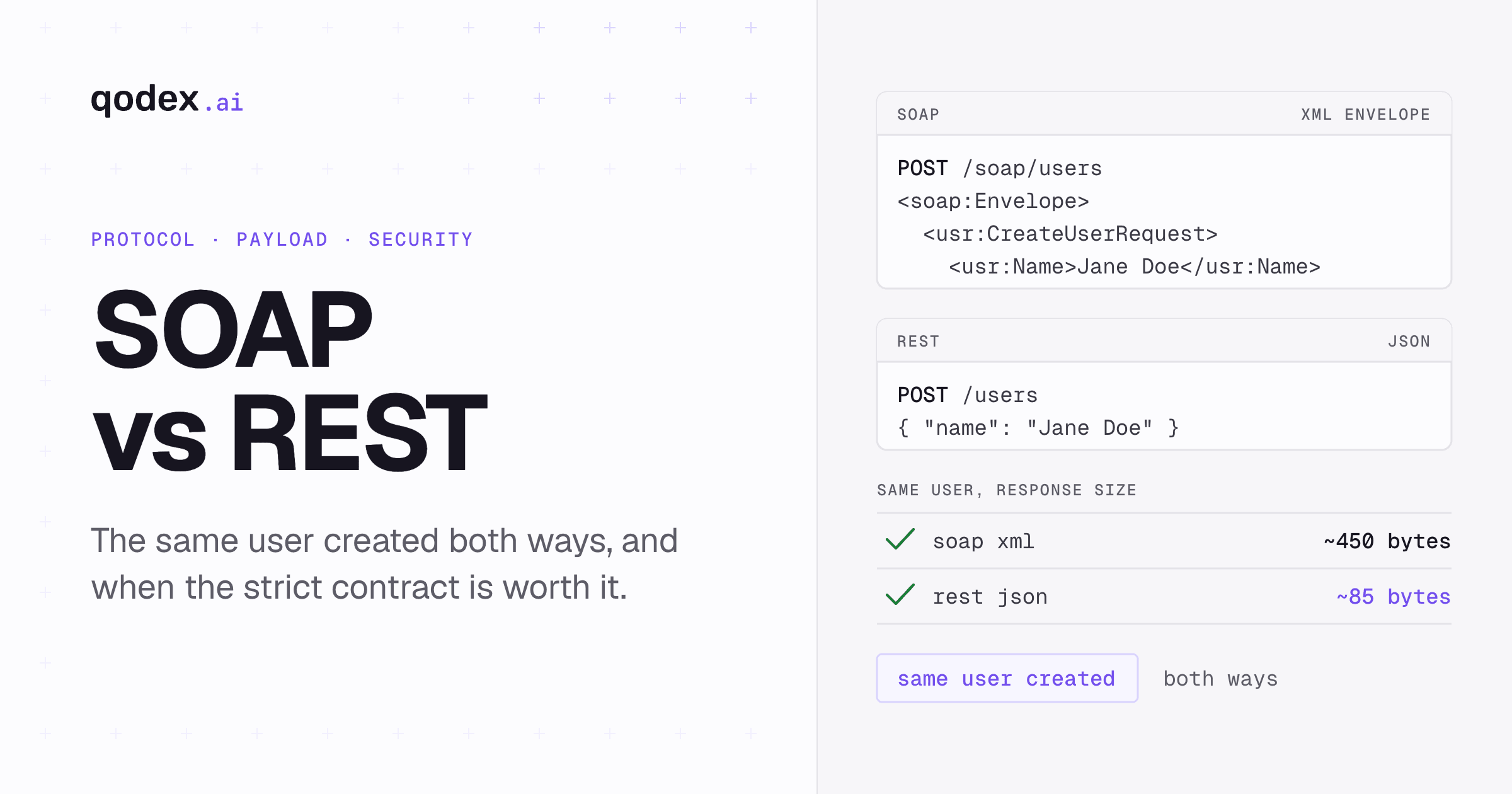
Code Comparison: Same Operation, Both Approaches
Let us compare creating a user in SOAP vs REST:
SOAP: Create User
# SOAP request to create a user
curl -X POST https://api.example.com/soap/users \
  -H "Content-Type: application/soap+xml" \
  -d '<?xml version="1.0" encoding="UTF-8"?>
<soap:Envelope xmlns:soap="http://www.w3.org/2003/05/soap-envelope"
               xmlns:usr="http://example.com/users">
  <soap:Body>
    <usr:CreateUserRequest>
      <usr:Name>Jane Doe</usr:Name>
      <usr:Email>jane@example.com</usr:Email>
      <usr:Role>developer</usr:Role>
    </usr:CreateUserRequest>
  </soap:Body>
</soap:Envelope>'
REST: Create User
# REST request to create a user
curl -X POST https://api.example.com/users \
  -H "Content-Type: application/json" \
  -H "Authorization: Bearer token123" \
  -d '{
    "name": "Jane Doe",
    "email": "jane@example.com",
    "role": "developer"
  }'
The REST version is shorter, more readable, and uses less bandwidth. The SOAP version provides strict typing and a formal contract but requires more XML boilerplate.
Client Code Comparison
Python, Calling a REST API:
import requests

response = requests.post("https://api.example.com/users", json={
    "name": "Jane Doe",
    "email": "jane@example.com",
    "role": "developer"
})
user = response.json()
print(f"Created user: {user['id']}")
Python, Calling a SOAP API:
from zeep import Client

client = Client("https://api.example.com/soap/users?wsdl")
result = client.service.CreateUser(
    Name="Jane Doe",
    Email="jane@example.com",
    Role="developer"
)
print(f"Created user: {result.Id}")
JavaScript, Calling a REST API:
const response = await fetch('https://api.example.com/users', {
  method: 'POST',
  headers: { 'Content-Type': 'application/json' },
  body: JSON.stringify({
    name: 'Jane Doe',
    email: 'jane@example.com',
    role: 'developer',
  }),
});
const user = await response.json();
console.log(`Created user: ${user.id}`);
JavaScript, Calling a SOAP API:
const soap = require('soap');

const client = await soap.createClientAsync(
  'https://api.example.com/soap/users?wsdl'
);
const [result] = await client.CreateUserAsync({
  Name: 'Jane Doe',
  Email: 'jane@example.com',
  Role: 'developer',
});
console.log(`Created user: ${result.Id}`);
Performance Comparison
Payload Size
XML (SOAP) payloads are significantly larger than JSON (REST) payloads for the same data:
// JSON response: ~85 bytes
{"id":123,"name":"Jane Doe","email":"jane@example.com","role":"developer"}

// SOAP XML response: ~450 bytes (5x larger)
<soap:Envelope xmlns:soap="...">
  <soap:Body>
    <GetUserResponse>
      <User>
        <Id>123</Id>
        <Name>Jane Doe</Name>
        <Email>jane@example.com</Email>
        <Role>developer</Role>
      </User>
    </GetUserResponse>
  </soap:Body>
</soap:Envelope>
Parsing Speed
JSON parsing is faster than XML parsing in most languages. Modern JavaScript engines parse JSON natively (JSON.parse), while XML requires DOM or SAX parsing which is more CPU-intensive.
Caching
REST APIs leverage HTTP caching natively, browsers, CDNs, and reverse proxies can cache GET responses based on URL and headers. SOAP requests are always POST (not cacheable by HTTP standard), requiring application-level caching.
When SOAP Is Faster
SOAP can outperform REST when using binary XML (MTOM) for large file transfers, or when WS-ReliableMessaging eliminates the need for retry logic in the application layer.
Security: SOAP vs REST
SOAP Security (WS-Security)
SOAP has a comprehensive security specification (WS-Security) that provides:
- Message-level encryption, Encrypt the XML payload itself, not just the transport
- Digital signatures, Sign individual elements within the SOAP message
- SAML tokens, Enterprise single sign-on support
- WS-Trust, Security token service for federated identity
This means SOAP messages remain secure even when routed through intermediaries, the message itself is protected regardless of transport.
REST Security
REST relies on transport-level security:
- HTTPS/TLS, Encrypts the entire communication channel
- OAuth 2.0 / JWT, Token-based authentication and authorization
- API keys, Simple authentication for server-to-server
- CORS, Browser-based access control
REST security is simpler to implement but does not provide message-level encryption. If a message is decrypted at a proxy, its contents are exposed. For most applications this is fine, but for high-security environments (banking, healthcare), SOAP's WS-Security provides an additional layer.
For more on securing your APIs, see our API security testing guide.
Testing SOAP vs REST APIs
Testing REST APIs
REST APIs can be tested with any HTTP client, curl, Postman, Insomnia, or code-based tools. See our REST API testing guide for comprehensive techniques and code examples.
Testing SOAP APIs
SOAP testing typically requires specialized tools that understand WSDL and XML namespaces:
# Test SOAP API with curl
curl -X POST https://api.example.com/soap/users \
  -H "Content-Type: application/soap+xml" \
  -d '<soap:Envelope xmlns:soap="http://www.w3.org/2003/05/soap-envelope">
  <soap:Body>
    <GetUser xmlns="http://example.com/users">
      <UserId>123</UserId>
    </GetUser>
  </soap:Body>
</soap:Envelope>'
# Python SOAP test with zeep
from zeep import Client

client = Client("https://api.example.com/soap/users?wsdl")

# Functional test
result = client.service.GetUser(UserId=123)
assert result.Name == "Jane Doe"
assert result.Email == "jane@example.com"

# Error test
try:
    client.service.GetUser(UserId=99999)
except Exception as e:
    assert "not found" in str(e).lower()
SoapUI remains the gold standard for SOAP testing, it can parse WSDL files, auto-generate test requests, validate XML schemas, and run security scans. For a comparison of all API testing tools, see our API testing tools comparison.
When to Choose SOAP vs REST
Choose SOAP When...
- Enterprise compliance requires WS-Security (message-level encryption, digital signatures)
- You need ACID transactions across distributed services (WS-AtomicTransaction)
- You are integrating with legacy systems that only support SOAP
- Formal contracts (WSDL) are required for governance and compliance
- You need reliable messaging (WS-ReliableMessaging) with guaranteed delivery
- Your industry (banking, healthcare, telecom, government) mandates SOAP standards
Choose REST When...
- You are building web or mobile applications that need fast, lightweight APIs
- You need HTTP caching for performance (CDN, browser cache)
- Your team wants simple, intuitive APIs with low learning curve
- You need broad tooling support (any HTTP client works)
- You are building microservices that communicate over HTTP
- You need to support multiple data formats (JSON, XML, CSV)
Consider Both
Many organizations maintain SOAP APIs for legacy and enterprise integrations while building REST (or GraphQL) APIs for new applications and public-facing services. You might also explore gRPC for internal microservice communication.
Migrating from SOAP to REST
If you are maintaining a SOAP API and considering migration to REST, here is a practical approach:
- Create REST endpoints alongside SOAP, Run both in parallel
- Map SOAP operations to REST resources, GetUser becomes GET /users/:id
- Convert WSDL types to JSON Schema, Maintain the same data contracts
- Migrate consumers gradually, Update clients one at a time
- Use integration tests to verify both APIs return equivalent data
- Deprecate SOAP endpoints once all consumers have migrated
Frequently Asked Questions
What is the main difference between SOAP and REST?
SOAP is a protocol with strict rules, XML-only messages, WSDL contracts, and formal specifications. REST is an architectural style with guidelines, resource-based URLs, HTTP methods, and typically JSON responses. SOAP is more structured and feature-rich; REST is simpler and more flexible.
Is REST better than SOAP?
REST is better for most modern web and mobile applications because it is simpler, lighter, and faster. SOAP is better for enterprise scenarios requiring message-level security, formal contracts, and ACID transactions. Neither is universally "better", the right choice depends on your requirements.
Why is REST more popular than SOAP?
REST is simpler to learn and use, produces smaller payloads (JSON vs XML), leverages native HTTP caching, and works naturally with web browsers and modern frontend frameworks. The rise of mobile apps and microservices, which favor lightweight communication, accelerated REST adoption.
Can SOAP and REST coexist?
Yes. Many organizations run SOAP APIs for legacy enterprise integrations alongside REST APIs for modern applications. This is common in banking, healthcare, and government where legacy SOAP services cannot be immediately replaced.
What is the advantage of SOAP over REST for security?
SOAP supports WS-Security, which provides message-level encryption and digital signatures. This means the message content is protected regardless of transport, even if decrypted at an intermediary proxy. REST relies on transport-level security (HTTPS), which protects data in transit but not at rest between hops.
How do you test SOAP APIs compared to REST APIs?
REST APIs can be tested with any HTTP client (curl, Postman, code libraries). SOAP APIs typically require specialized tools like SoapUI that understand WSDL and XML namespaces. Qodex.ai supports testing both API types. See our API testing tools comparison for tool recommendations.