What Is Load Testing? Load vs Stress vs Performance Testing
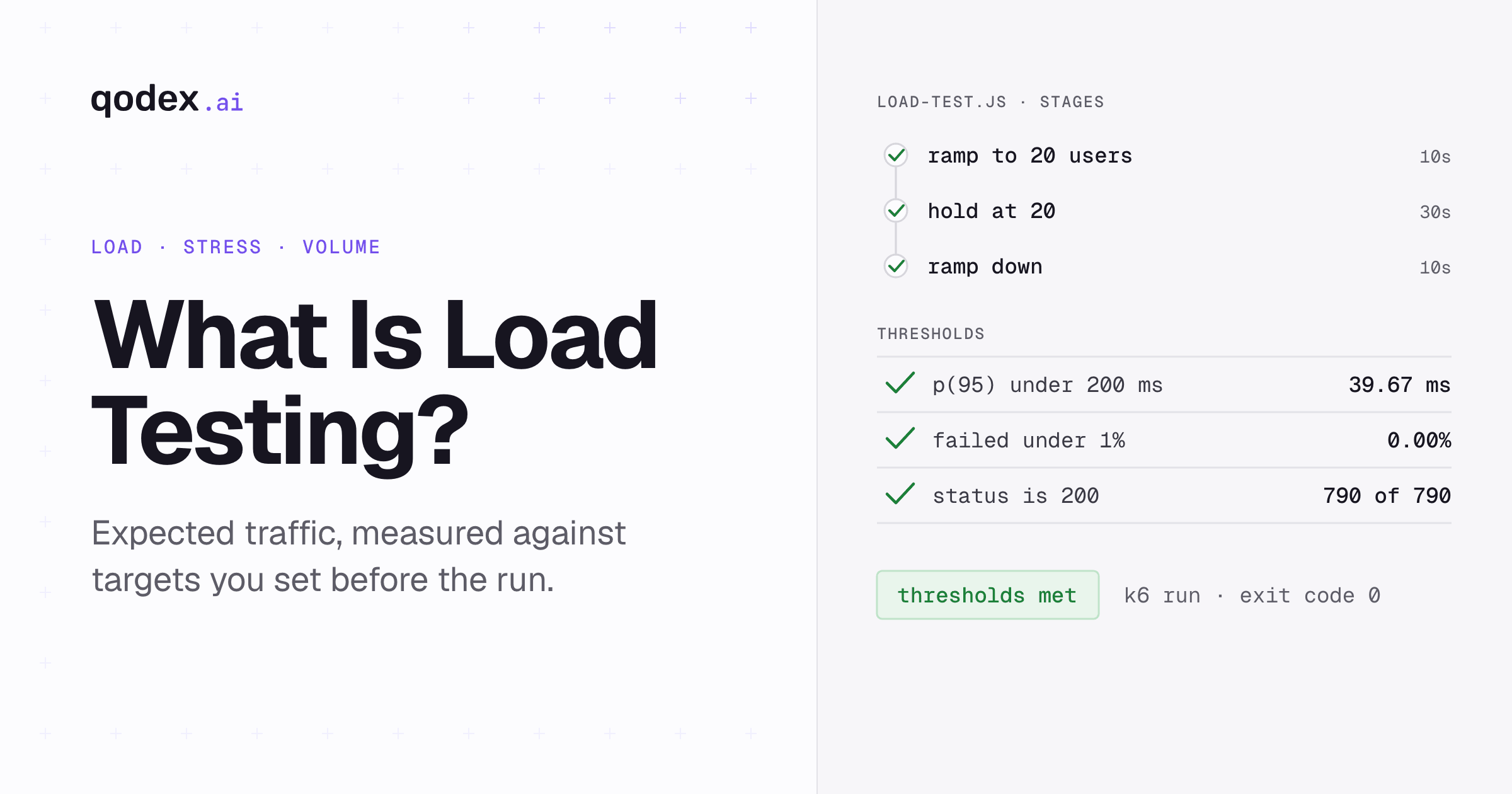
Load testing is a type of performance testing that sends the traffic you expect at an application and measures how it responds. A script simulates many virtual users at once, holds that load for a set time, and records response times, throughput and errors. The test passes if those numbers stay inside targets you set beforehand, such as 95% of requests under 200 milliseconds.
Load tests measure speed, so pair them with tests for correctness. Qodex is an AI QA agent that writes and runs functional and security tests for APIs and web apps from a chat.
How a load test works
This guide splits a load test into four parts:
- A scenario. The requests one simulated user makes, in order: open the product list, add to cart, check out. Real users pause between steps, so the script adds think time.
- A load profile. How many virtual users run the scenario and how that number changes over time. The example on this page ramps up, holds at the target, and ramps down.
- Measurements. Response time for each request, requests per second, and the share of requests that failed. Good tools report percentiles, not just averages.
- Pass or fail criteria. Targets written down before the run, for example "95th percentile under 200 ms and under 1% errors". Without them, a load test produces numbers but no verdict.
A virtual user is not a browser. In a protocol-level tool such as k6 or JMeter it is a lightweight loop that sends HTTP requests, so one machine can simulate many of them.
Load testing vs stress testing vs performance testing
Performance testing is the umbrella term. Load, stress, spike, soak, volume and scalability tests are kinds of performance test, and they differ in the shape of the traffic and the question they answer.
| Test | Question it answers | Load shape | Passes when |
|---|---|---|---|
| Load test | Does it meet targets at expected traffic? | Ramp to expected peak, hold, ramp down | Targets met for the whole hold |
| Stress test | Where does it break, and does it recover? | Keep raising load past the expected peak | You know the breaking point and recovery works |
| Spike test | Can it absorb a sudden surge? | Jump from normal to a multiple of normal in seconds | Errors stay low and latency recovers |
| Soak (endurance) test | Does it degrade over hours? | Moderate load held for hours | No creeping latency, memory or connection growth |
| Volume test | Does it cope with large amounts of data? | Normal traffic against a large dataset or payloads | Queries and responses stay within targets |
| Scalability test | Does adding capacity add throughput? | The same test repeated as servers are added | Throughput rises with capacity |
Load testing and stress testing differ in the question they ask. A load test asks "do we meet our targets at the traffic we expect?" A stress test asks "how much traffic until we fail, and what happens then?" A system can pass a load test and still collapse a little above that traffic, which is why both are worth running.
Volume testing is the one that does not add users. It keeps traffic normal and grows the data, for example a table with 50 million rows, a 10 MB upload, or a search across years of history. A slow query that stays hidden on a small test database shows up here.
Load testing metrics that matter
- Response time percentiles. The 95th percentile (p95) is the time within which 95% of requests finished. Read p95 and p99, because an average hides the slow requests that users notice.
- Throughput. Requests or transactions per second the system completed. When you add users and throughput stops rising, you have found a limit.
- Error rate. The share of requests that failed or returned 5xx. Under overload, some systems slow down and others refuse work; error rate catches the second kind.
- Saturation. CPU, memory, database connections and queue depth on the servers, read from your monitoring during the run. They tell you why a limit exists, not just where.
How many virtual users do you need?
Users, request rate and response time are tied together by Little's law from queueing theory. When each user makes one request per loop: concurrent users = throughput × (response time + think time).
Say production peaks at 300 requests per second, a request takes 0.2 seconds, and a real user waits 5 seconds before the next click. That is 300 × (0.2 + 5) = 1,560 concurrent users. Simulate 1,560 virtual users with 5 seconds of think time and you reproduce the peak. Leave the think time out and the same 1,560 users would hammer the system with several times the real request rate.
The run below checks the law. It holds 20 users with 1 second of think time against requests that take about 0.03 seconds, so it should complete 20 ÷ 1.03, about 19.4 requests per second, during the hold.
Run your first load test
This example runs on your own machine. It needs Node.js and k6, the open-source load tester from Grafana Labs; we ran it with Node.js 26 and k6 v2.3.0.
Save this small API as server.js. It waits 20 to 40 ms of simulated work per request, and to stand in for a real capacity limit it returns 503 once 50 requests are in flight.
// server.js: a small API to load test on your own machine
const http = require('node:http');

const CAPACITY = 50; // simulated limit: past 50 requests in flight, answer 503
let inFlight = 0;
const orders = new Map();

function send(res, status, body) {
  res.writeHead(status, { 'content-type': 'application/json' });
  res.end(JSON.stringify(body));
}

http.createServer((req, res) => {
  if (inFlight >= CAPACITY) return send(res, 503, { error: 'overloaded' });
  inFlight++;
  res.on('close', () => inFlight--);
  let raw = '';
  req.on('data', (chunk) => (raw += chunk));
  req.on('end', () => {
    // 20 to 40 ms of simulated work per request
    setTimeout(() => {
      if (req.method === 'GET' && req.url === '/products') {
        return send(res, 200, [{ id: 1, name: 'Keyboard', price: 49 }]);
      }
      if (req.method === 'POST' && req.url === '/orders') {
        let order;
        try { order = JSON.parse(raw); } catch { return send(res, 400, { error: 'invalid JSON' }); }
        if (!Number.isInteger(order.productId) || !Number.isInteger(order.qty) || order.qty < 1) {
          return send(res, 422, { error: 'productId and qty must be positive integers' });
        }
        const id = String(orders.size + 1);
        orders.set(id, { id, ...order });
        return send(res, 201, orders.get(id));
      }
      const match = req.url.match(/^\/orders\/(\d+)$/);
      if (req.method === 'GET' && match && orders.has(match[1])) {
        return send(res, 200, orders.get(match[1]));
      }
      send(res, 404, { error: 'not found' });
    }, 20 + Math.random() * 20);
  });
}).listen(3333, '127.0.0.1', () => console.log('API listening on http://127.0.0.1:3333'));
Save the load test as load-test.js. It ramps to 20 users, holds for 30 seconds, ramps down, and sets two pass or fail thresholds.
// load-test.js: expected traffic, then a pass or fail verdict
import http from 'k6/http';
import { check, sleep } from 'k6';

export const options = {
  stages: [
    { duration: '10s', target: 20 }, // ramp up to 20 virtual users
    { duration: '30s', target: 20 }, // hold the expected load
    { duration: '10s', target: 0 },  // ramp down
  ],
  thresholds: {
    http_req_duration: ['p(95)<200'], // 95% of requests under 200 ms
    http_req_failed: ['rate<0.01'],   // under 1% errors
  },
};

export default function () {
  const res = http.get('http://127.0.0.1:3333/products');
  check(res, { 'status is 200': (r) => r.status === 200 });
  sleep(1); // think time between a user's requests
}
Run node server.js in one terminal and k6 run load-test.js in another. Our run ended like this:
  █ THRESHOLDS

    http_req_duration
    ✓ 'p(95)<200' p(95)=39.67ms

    http_req_failed
    ✓ 'rate<0.01' rate=0.00%

    http_req_duration..............: avg=30.98ms min=19.95ms med=31.34ms max=41.99ms p(90)=38.72ms p(95)=39.67ms
    http_req_failed................: 0.00%  0 out of 790
    http_reqs......................: 790    15.616704/s
    vus............................: 2      min=2        max=20

running (0m50.6s), 00/20 VUs, 790 complete and 0 interrupted iterations
default ✓ [ 100% ] 00/20 VUs  50s
Both thresholds passed, and k6 exited with code 0. The overall rate of 15.6 requests per second is lower than the 19.4 Little's law predicts, because it averages in the two 10-second ramps. The profile averages about 16 active users over its 50 seconds (10 during each ramp, 20 during the hold), and 16 ÷ 1.03 is 15.5, which matches.
To see a failure, change the budget to p(95)<25 and run it again. Our rerun printed ✗ 'p(95)<25' p(95)=39.32ms and k6 exited with code 99, which fails a CI job. For a test that keeps adding users until this server breaks, see the stress test in our performance testing tools roundup.
A load testing process in six steps
- Set targets from production data. Peak requests per second, the response time users tolerate, and an acceptable error rate. Write them as thresholds.
- Pick the flows that matter. Login, search, checkout, the busiest API endpoints, and any endpoint that writes to the database.
- Model real users. Mix reads and writes in production proportions, add think time, and vary the test data so caches do not make every request look fast.
- Use a production-like environment. A staging system with, for example, a tenth of production's data answers a different question. Never point a load test at production without agreement from whoever runs it.
- Watch the servers during the run. CPU, memory, database connections and queue depth explain why a threshold failed.
- Repeat after every significant change. A small load test with thresholds in CI catches a slow query before release; save full stress and soak tests for release candidates.
Common load testing mistakes
- No think time. A virtual user with no pauses sends requests as fast as the server answers, far faster than a person clicks, so the test overstates load.
- Reading only the average. For example, an average of 120 ms can hide a p99 of several seconds.
- Generating load from an overloaded machine. If the load generator's own CPU is at 100%, the response times measure the generator. Check its resources too.
- One endpoint, one payload. Hitting the same URL with the same data can measure the cache more than the system.
- Forgetting third parties. A payment or email provider with its own rate limit can fail first. Stub it or agree a test window with the provider.
- Testing once. Performance can change with any release. Keep a small scripted test in the pipeline.
Load testing tools
The common open-source starting points are Apache JMeter (GUI and many protocols), Grafana k6 (JavaScript), Gatling (Java, Kotlin, Scala and JavaScript), Locust (Python) and Artillery (YAML and JavaScript). Commercial platforms such as Tricentis NeoLoad, OpenText LoadRunner and BlazeMeter add managed scale and enterprise protocols. Our performance testing tools comparison covers ten of them with prices read on 23 October 2026, and NeoLoad vs JMeter compares a commercial and an open-source tool head to head.
For APIs, see API load testing: tools and how to load test an API. To measure page speed inside browser tests, read Playwright performance testing.
Conclusion
Load testing answers one question: does the system meet its targets at the traffic you expect? Write the targets down, model real users with think time, read percentiles, and let thresholds decide pass or fail. Then run stress, spike, soak and volume tests to learn what happens beyond expected traffic.
Frequently Asked Questions
What is load testing in software testing?
It is a non-functional test that checks how a system behaves under expected user traffic. A tool simulates concurrent users, measures response times, throughput and errors, and compares them with targets agreed in advance.
What is the difference between load testing and stress testing?
Load testing holds the traffic you expect and checks that targets are met. Stress testing keeps raising traffic past that point to find where the system breaks and whether it recovers cleanly afterwards.
What is volume testing?
Volume testing keeps traffic normal and increases the amount of data: larger tables, bigger payloads or longer histories. It finds slow queries and memory problems that a small test database hides.
What are the main types of load testing?
Strictly these are types of performance testing, and "load testing" is one of them. The usual list is load, stress, spike, soak (endurance), volume and scalability testing. Each changes the traffic shape or the data size to answer a different question.
Can you give an example of load testing?
An online store expects 300 requests per second at its sale peak. A load test simulates enough virtual users with realistic pauses to reach that rate, holds it for 30 minutes, and passes if 95% of requests finish under 200 ms with under 1% errors.
How often should you run load tests?
Run a short load test with thresholds on every significant release, ideally in CI, so a regression fails the build. Run longer stress and soak tests before major launches and expected traffic peaks.