
Chaining and postscripts
Chaining lets one API step use data returned by an earlier step. Use it for flows like login then fetch profile, create user then update user, or create order then verify order status.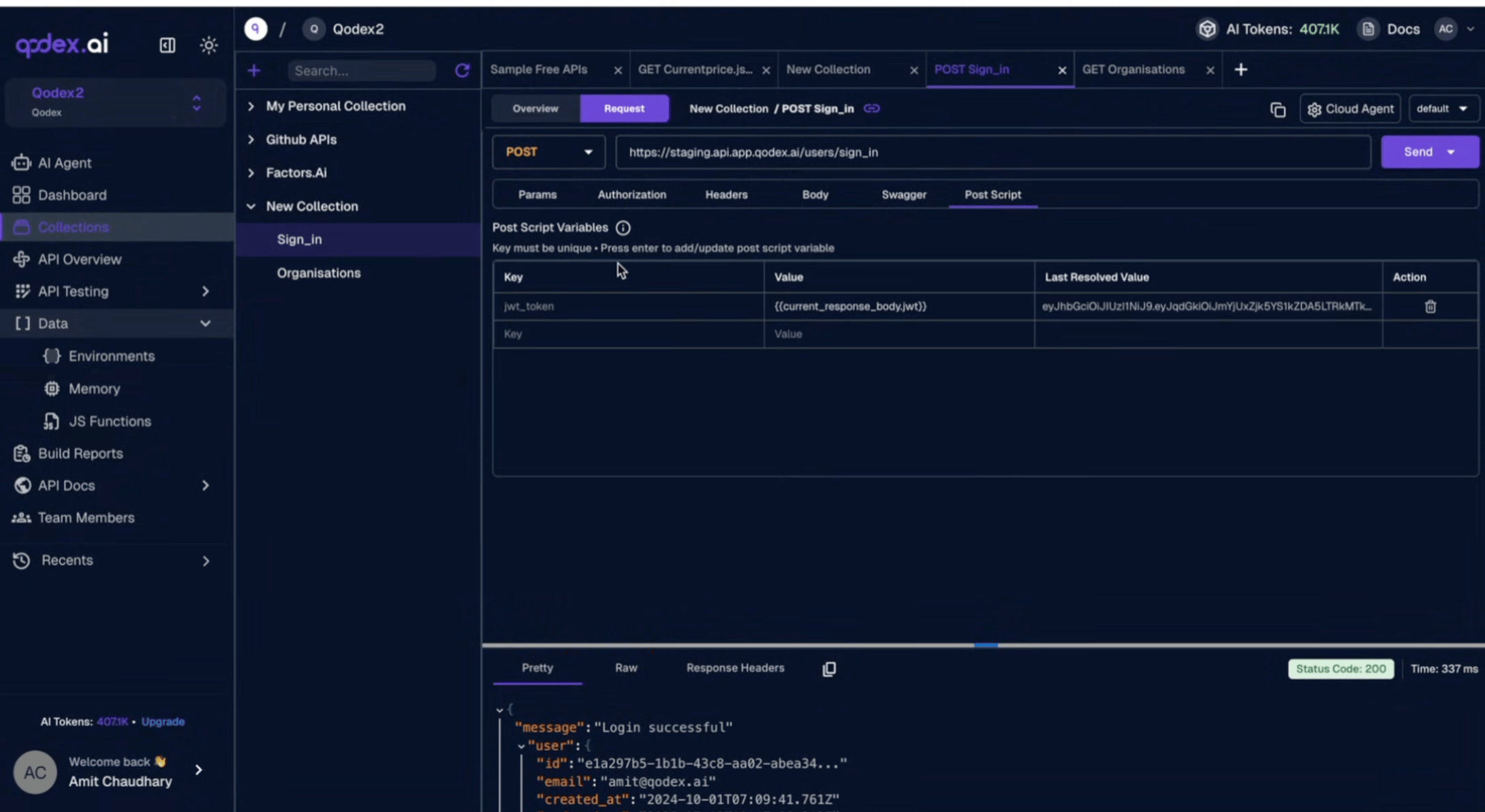
How chaining works
Every step in an API scenario can declarecaptures. A capture is a JSONPath into the response body plus a name for the value.
Later steps reference that name in headers, body, URL, query params, or any other string field. The runner substitutes the captured value when the request is sent.
A two-step login-then-fetch scenario, captured shape:
- Step 1 logs in. The capture
{ "as": "token", "from": "$.access_token" }readsaccess_tokenoff the JSON response body. - Step 2 uses
${token}in theAuthorizationheader. The runner substitutes the captured value before the request fires.
Where you can use captured values
${var} interpolation runs on every string field of a step:
- Request body (raw, JSON, form-urlencoded, multipart).
- Headers.
- URL path and query params.
- Auth values (bearer token, API key).
Authorization: Basic ${user}:${pass} will not produce valid Basic credentials. For Basic auth, use the structured step.auth = { type: "basic", username, password } shape and let the runner encode it.
Environment variables
Two flavors of variable resolve at send time:- Captures from earlier steps in the same scenario (
${token},${userId}). - Environment variables from the active environment (
${API_BASE_URL},${AUTH_EMAIL}, custom values you’ve added).
${var} syntax. The runner builds one merged map at send time and substitutes.
Postscripts: writing values back to the environment
The API Playground supports declarative postscripts via thepostExtract array on a saved request. After the response arrives, each rule runs and writes its captured value back into the active environment as a variable.
In the Playground, add rules on the request’s Post tab. Each row has a Source, a Path, and a Target env var.
bodyreads JSON via a small JSONPath subset.headerreads a response header by name, case-insensitive.statusreads the numeric HTTP status;pathis ignored.
AUTH_TOKEN into the environment. Every later request in the same environment that references {{AUTH_TOKEN}} or ${AUTH_TOKEN} picks up the freshly captured value.
When to use captures vs postscripts
- Captures belong on a scenario when one step’s output feeds another step’s input in the same run. They’re scoped to the scenario and disappear after the run.
- Postscripts belong on a saved API Playground request when you want the captured value to persist across requests and across sessions, the playground equivalent of “save this token in my environment.”
On the roadmap
Related
Scenarios
See the full scenario shape captures attach to.
API Playground
Where postscripts live.
Auth profiles
Run the same scenario as multiple identities.
Request data generation
How Qodex fills request bodies.