
Triage workflow
Triage is the process of deciding what a finding means and what your team should do with it. Most findings start as open. From there, you can mark them fixed, false positive, or won’t fix. A candidate Qodex was not sure enough to file starts as needs review and waits for a person to decide.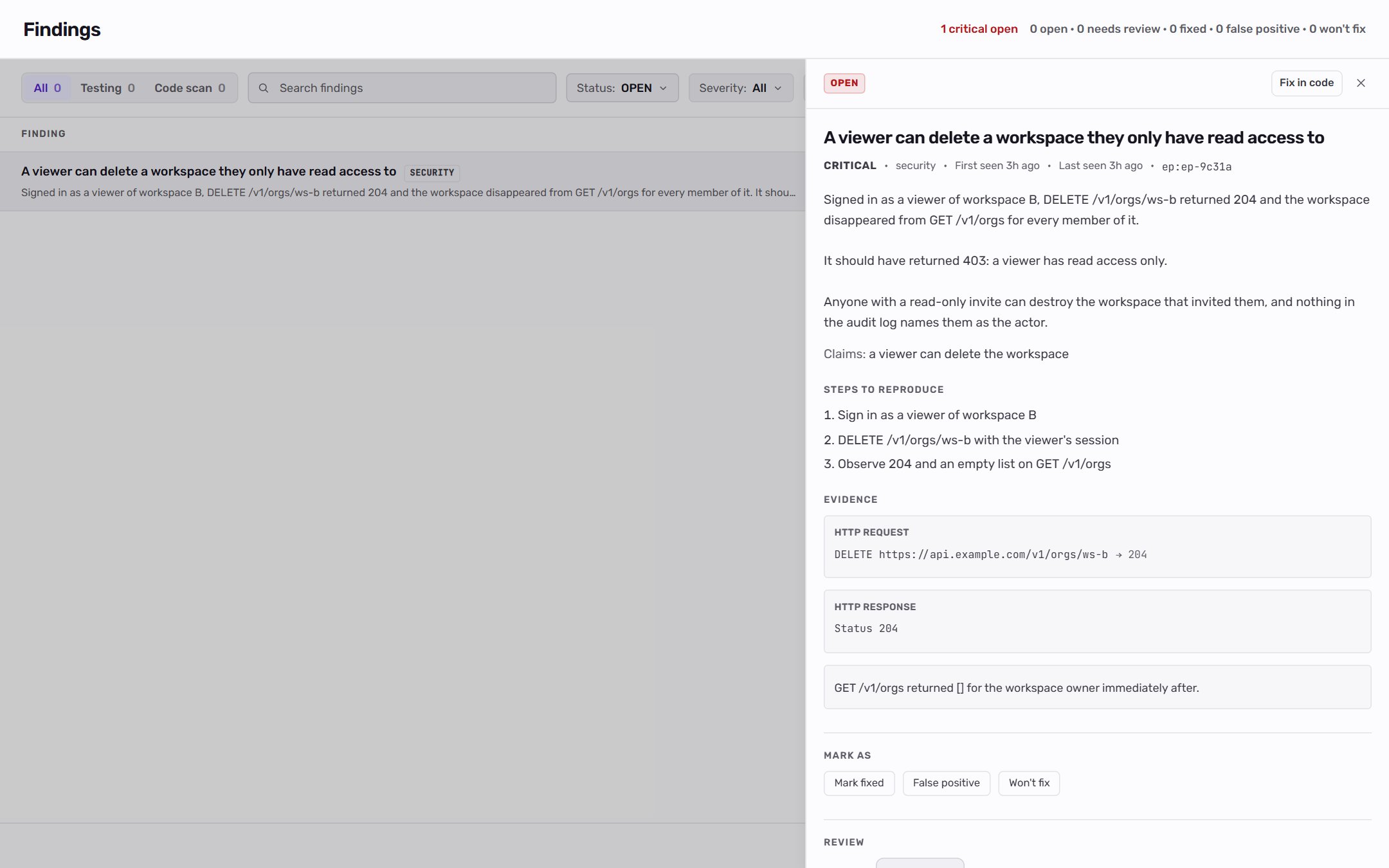
1. Open the Findings page
Click Findings near the top of the sidebar. The header shows how many findings are critical and open, plus a count for every status, including empty ones, so you can see what sits behind each filter.2. Filter the list
Use the toolbar to focus the queue:- All / Testing / Code scan: everything, only findings from tests and chat, or only findings a code scan filed. Each option shows its count.
- Search findings: matches title, description, or category.
- Status: pick one or more of Open, Needs review, Fixed, False positive, and Won’t fix. The list opens on Open. If the project has security findings, it opens on Open and Needs review.
- Severity: Critical, High, Medium, Low, or Info.
- Category: security, functional, UI, performance, accessibility, data integrity, API error, or other. Shown once the project has categorized findings.
- Repository: a linked repository, or No repository for findings no code scan stands behind. Each option shows its count.
×N next to the title means the issue was observed N times. A Reproduced chip means an agent showed the bug on a test environment. A set mark beside the severity means a person chose it.
3. Review the evidence
Click a finding to open the detail panel:- Severity, category, first and last seen, and a link to the scenario that produced it.
- Reviewed: the latest decision a person made, above the description.
- The description and, for access findings, a Claims line such as “a viewer can delete the project”.
- Steps to reproduce.
- Evidence: HTTP request and response, screenshots, logs, URLs, notes, and a Basis line saying what the finding was judged against, such as a rule you wrote, your answer to a question, what a run observed, or a line of code.
4. Decide on held candidates
A finding with the Needs review status has a Waiting for you section that explains why Qodex held it, usually because nothing you have written says the behavior is wrong. Choose:- File as a bug to open it as a finding.
- Dismiss to close it as a false positive.
5. Set the status
For every other finding, use the Mark as buttons: Reopen, Mark fixed, False positive, or Won’t fix.
The status updates the same finding whether you change it from the web app, chat, or an MCP client.
6. Adjust severity
Under Review, pick a different Severity and say why. A severity change needs a reason, and the reason is shown to whoever reads the finding next. You can also add a note without changing severity. Click Save.7. Re-run when needed
After a fix, re-run the related scenario or suite. If the finding no longer reproduces, mark it fixed. If it still fails, keep it open and use the latest evidence. On the test run page, a failing check for a finding that was already open reads Still present.Project admins using Autopilot may also see Fix in code on an open finding. It sends the bug to the Auto-fix agent, which opens a pull request for a person to review. Once the pull request is open, the finding shows a Fix PR opened chip. Members do not see the button. See Missions and agents.
Related
Severity model
Understand how impact is ranked.
Failure classification
See how Qodex decides whether to open a finding.
Run tests
Generate or verify findings.
Findings concept
Read the shorter overview.