
API governance
API governance shows API coverage across every endpoint Qodex knows about. Use it to answer practical questions: which endpoints are tested, which are untested, which are failing, and where Qodex should generate more coverage.Where to find it
Open API under Context in the sidebar and pick a collection from the dropdown at the top right. The API governance page shows the collection’s coverage bar, a summary line, four risk tiles, and the filterable endpoint list. If the project has no API collection yet, the page shows No API spec yet with an Add a spec button that opens the spec import step.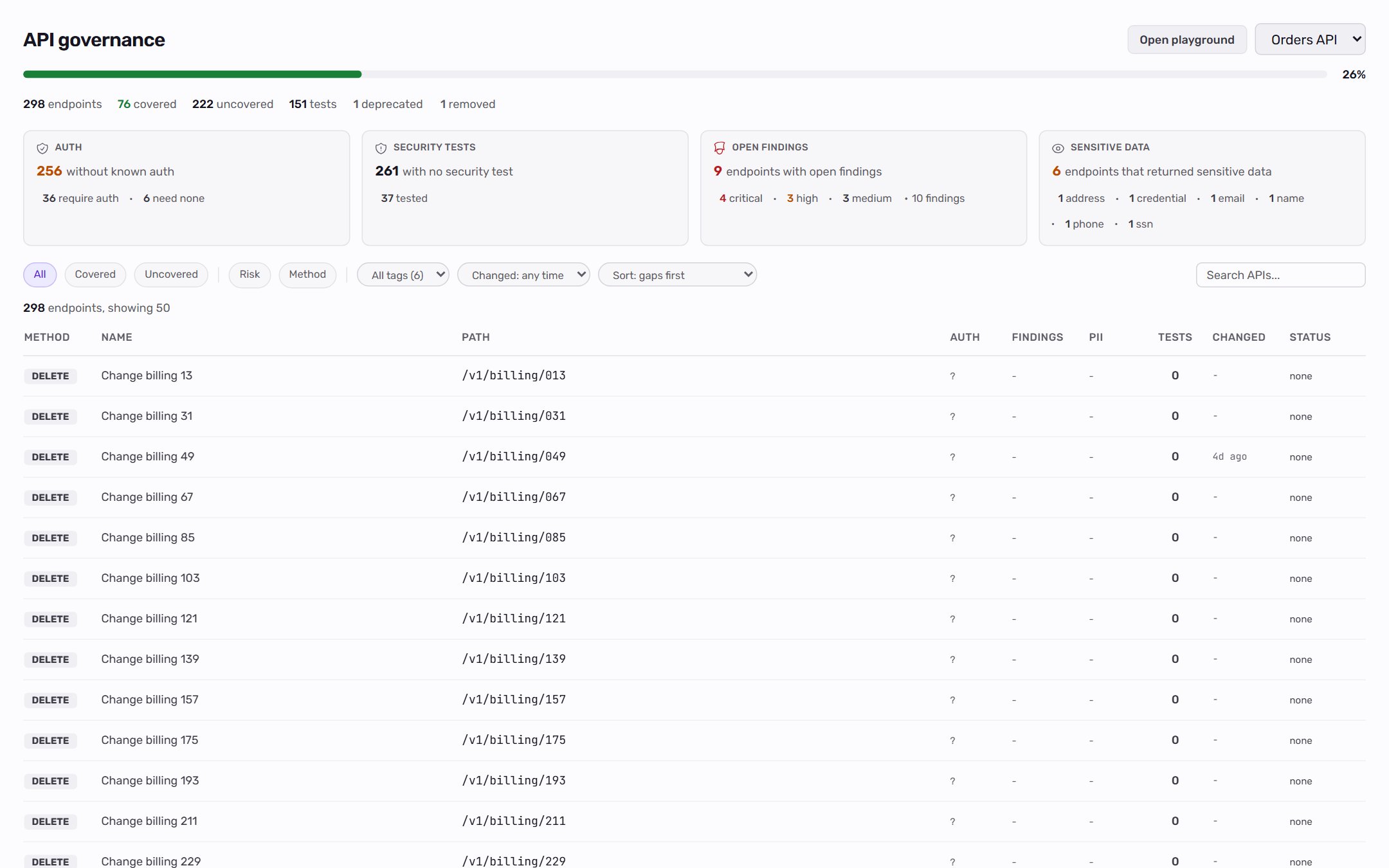
How it works
Governance reads the same endpoint rows used by imports, the endpoint catalog, the API Playground, and discovery. There is no separate coverage database, so the catalog you see and the numbers the agent uses stay aligned. The top of the page summarizes the collection:- Coverage bar: the percentage of active endpoints touched by at least one scenario.
- Summary line: endpoints, covered, uncovered, and tests. When the collection has deprecated or removed endpoints, N deprecated and N removed appear here too; click either to list them.
- Cover N gaps: shown when some endpoints have no scenarios. It opens chat so you can confirm and start a coverage run for those endpoints.
- Method, name, and path.
- Auth: required, none, or unknown, with a warning when declared and observed auth disagree.
- Open findings tied to the endpoint, by severity.
- Sensitive data the endpoint returned in a captured response.
- Tests: the number of scenarios covering it.
- Changed: how long ago the endpoint’s definition last changed.
- Status: whether the last run passed, failed, or errored, or
nonewhen nothing covers it.
The risk tiles
Four tiles sit above the list. Each headline and secondary number is a count of endpoints, and clicking a number filters the list to exactly those endpoints (it clears other filters first). Click the same number again to clear it.
To combine conditions the tiles cannot express, such as open findings and no security test, use the Risk menu in the filter row. See Filtering for every filter.
How endpoints enter the catalog
Endpoints arrive from three places:- Spec import: every HTTP operation in an OpenAPI or Swagger document, plus every request in a Postman collection. Spec-derived fields (request schema, response schema, parameters, summary) populate at import time.
- Auto-discovery: the deterministic crawler walks your app and captures every API call the UI makes. New method and path pairs are added to the catalog with their observed headers, status, and body shape.
- Live runs: every scenario execution syncs the endpoints it touched back to the catalog, incrementing the test count and updating last-tested timestamps.
Coverage status definitions
The “touch” rule is deliberately generous. An auth endpoint that appears as a setup step in twenty scenarios counts as covered because those flows exercise it. A stricter “primary subject only” rule made login-heavy APIs look misleadingly uncovered. The any-step rule better matches what teams mean by “this endpoint has tests.”
The fill-coverage scan mode
fill-coverage is a scan mode that targets endpoints with zero scenarios. The agent:
- Looks up the uncovered endpoints.
- Clusters the uncovered endpoints by tag or path prefix into groups of 5 to 8.
- Spawns up to 5 parallel sub-agents (one per cluster) to author scenarios.
- Re-queries gaps between waves to converge on full coverage.
When governance matters
- Use it for quarterly QA review: what is covered, what is not, and what changed.
- Use it before a release: are any critical endpoints failing?
- Use it after a spec import or a collection sync: which new or changed endpoints have zero coverage? Set Changed to the last 7 days and pick Uncovered.
- Use it for security sweeps: which auth-required endpoints have no security tests?
When not to use it
- Single-endpoint debugging. Use the API Playground for that. The catalog is the bird’s-eye view.
- Real-time alerting. Governance reflects state at view time. For real-time pass/fail signals, watch test-run dashboards.
On the roadmap
Related
Endpoint catalog
The queryable list of every endpoint.
Scenarios
The unit being counted as coverage.
Auth profiles
How role-aware coverage gets clean.
Findings
What surfaces when a covering scenario fails.