
Import an OpenAPI spec
Import an OpenAPI 3.x or Swagger 2.0 spec when you want Qodex to start from a formal API contract. Qodex parses the spec, catalogs every endpoint, preserves schemas and auth metadata, and uses that catalog to author API scenarios.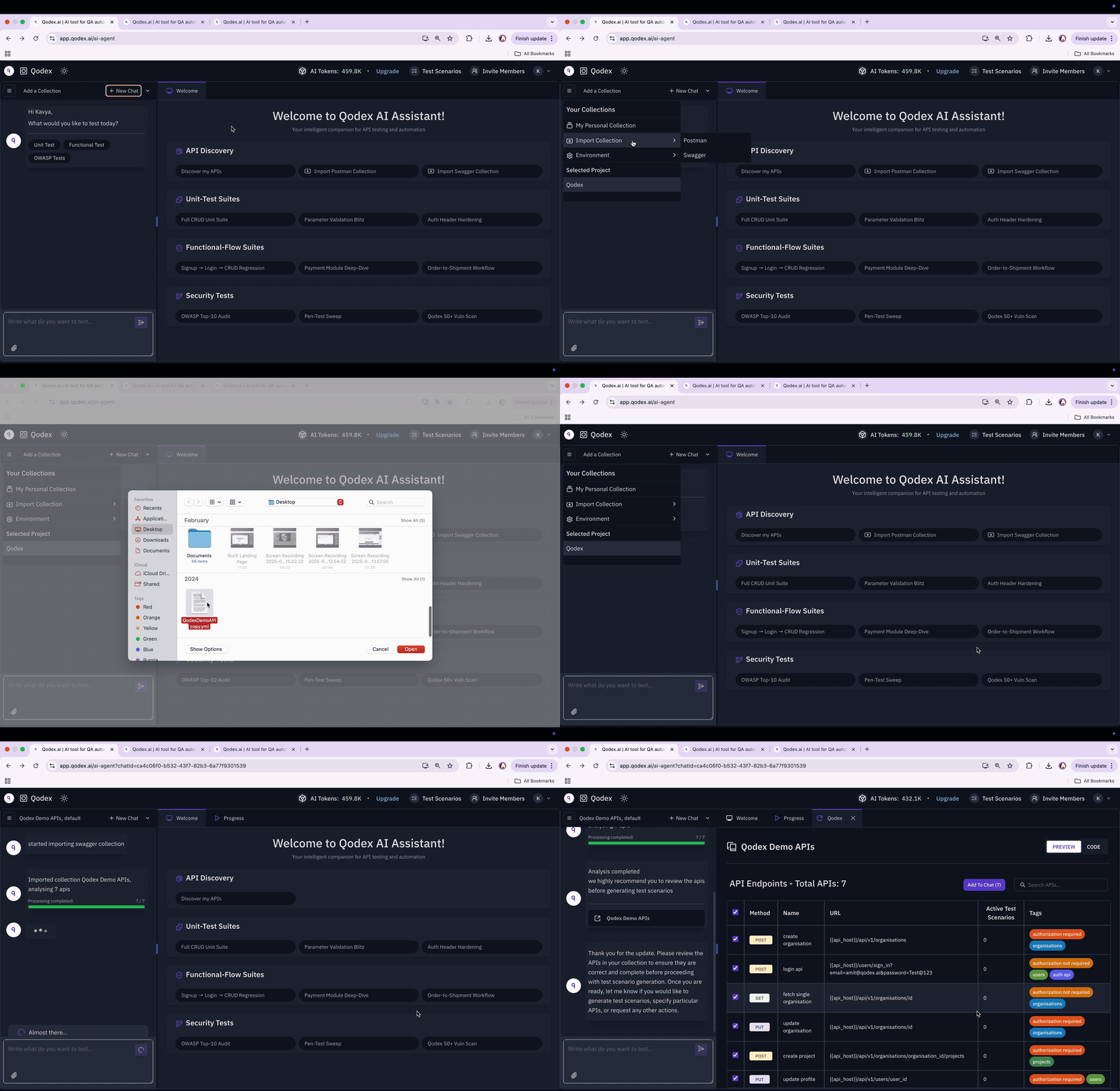
Prerequisites
- A project in Qodex.
- An OpenAPI 3.x or Swagger 2.0 document. JSON or YAML, file or URL.
- One environment with the base URL of the system under test.
1. Upload the spec
In chat, attach the.yaml, .yml, or .json file. You can also paste a public URL and Qodex will fetch and parse it.
paths becomes a row in the endpoint catalog with method, path, parameters, request schema, response schema, and tags preserved.
Only HTTP methods become operations. Other keys on a path item, such as parameters, servers, summary, or description, are not imported as endpoints. A path item that is a $ref alias for another path imports the endpoints it points to, under the alias path your clients call.
2. Review discovered endpoints
Open API under Context in the sidebar and pick the new collection to review what was imported. Every operation appears with its method, path, name, and tags, and the import is recorded in each endpoint’s History tab. Use the Tag filter to focus on one module, such as auth, payments, or users. Click Uncovered to find endpoints with zero scenarios. The catalog row is the source of truth. Edits you make to name, headers, body, or auth persist to the same record the API Playground uses, so governance and playground do not drift.3. Configure auth profiles
If your spec declaressecuritySchemes, Qodex preserves the structured shape on each endpoint and shows it during authoring. The agent copies it into step.auth without reinterpreting it.
For runtime auth, create one auth profile per role you want to test:
adminfor privileged operations.userfor regular-account access.viewerfor read-only checks.
4. Author your first scenario from chat
In a chat, ask:POST /users, generates two scenarios, verifies them against your default staging environment, and saves both as draft. Promote them to active when you want scheduled or event-driven runs to include them.
Try it yourself
Endpoint catalog
Browse every endpoint Qodex has cataloged.
Scenarios
See how a generated scenario is structured.
Next steps
Auth profiles
Run as admin, regular user, and viewer.
API governance
See coverage across every endpoint.