
Endpoint catalog
The endpoint catalog is the map of your API inside Qodex. It shows every endpoint Qodex knows about, where it came from, what auth and request shape it uses, whether it has test coverage, and how its definition has changed over time.Where to find it
Open API under Context in the sidebar. The page is titled API governance. Pick a collection from the dropdown at the top right; the page remembers it in the URL, so a reload returns to the same collection. The list loads 50 endpoints at a time and loads more as you scroll. The count line above the table says how many endpoints match the current filters, for example “59 of 3,134 endpoints, showing 50”. Each row shows the method, name, path, auth, findings, PII, tests, when the definition last changed, and the last run status.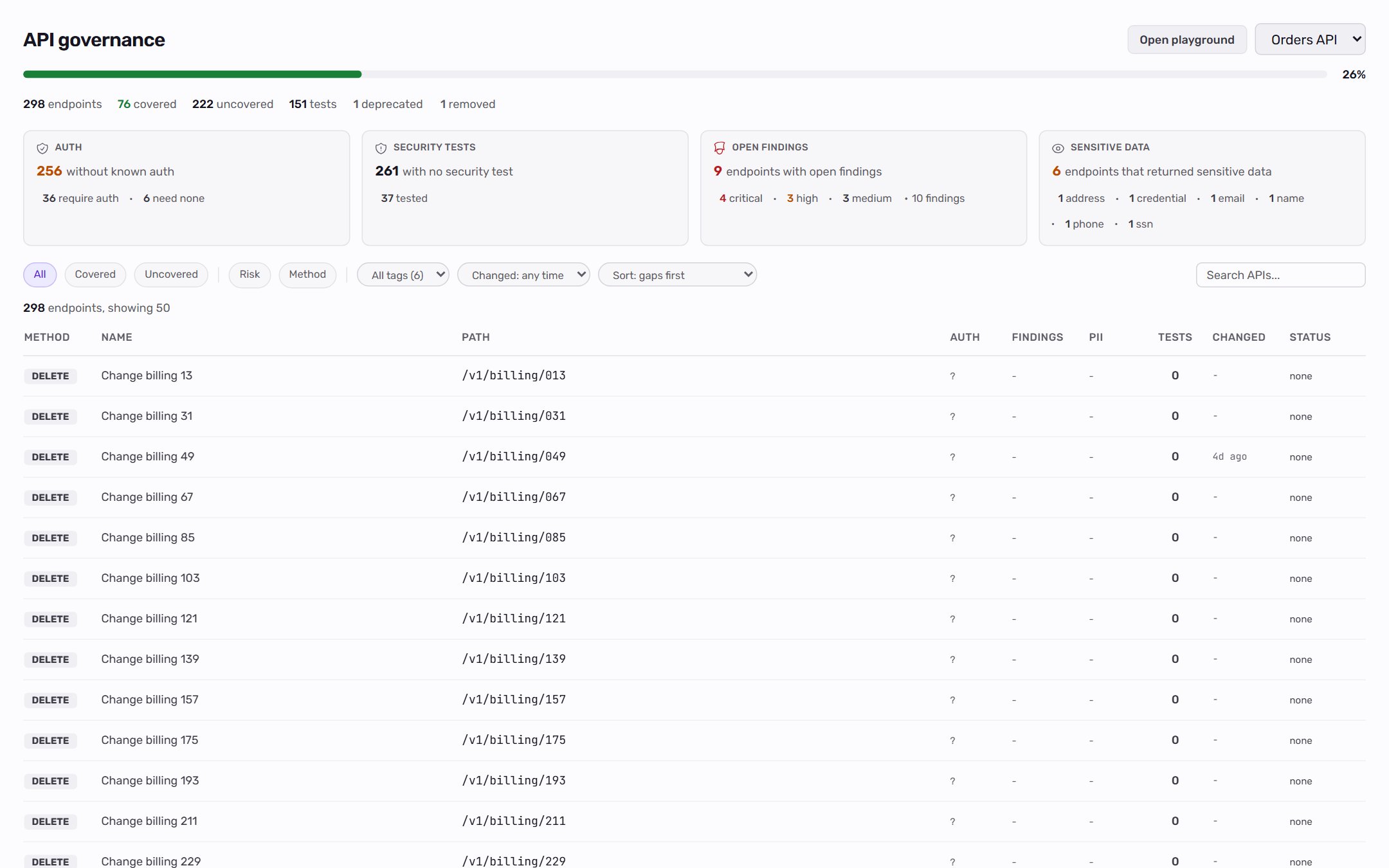
How it works
Every endpoint lives as one editable row. That row carries:- Spec-derived fields: method, path, summary, operation ID, tags, request schema, response schema, parameters.
- Playground-owned fields: a user-set name, full URL with
{{var}}tokens, headers, params, body, settings, auth. - Discovery fields: observed auth type, missing security headers, sensitive data fields detected, security issues observed.
- Coverage signals: test count, passing tests, failing tests, last tested timestamp.
- Lifecycle and history: whether the endpoint is active, deprecated, or removed, and a log of every definition change.
Filtering
The filter row under the summary tiles narrows the list:
Filters stack. For example, open Risk, pick Requires auth and No security test, then set Tag to
users to find protected user endpoints with no security coverage.
Every active filter appears as a chip next to the count line. Click the x on a chip to clear that filter, or Clear all to reset. Filters are stored in the page URL, so you can share a link to a filtered list.
The four summary tiles above the filters (Auth, Security tests, Open findings, Sensitive data) are shortcuts. Clicking a number clears the other filters and shows exactly those endpoints; clicking it again clears it. See API governance for what each tile counts.
The API details panel
Click a row to open the API details panel. Its header holds Open in playground, the lifecycle actions, and Generate tests. The panel has five tabs:
An Edited badge in the panel header means the request was changed and saved in the Playground.
Team notes and Qodex observations
The Overview tab keeps two kinds of notes apart:- Team notes are written or approved by people on the project. Qodex treats them as rules it may cite. Click Edit to write them, one rule per line.
- Qodex observations are what Qodex saw in earlier runs. Nobody has confirmed them, so Qodex uses them as context and never as a rule. Click Approve next to an observation to move it into team notes.
Editing requests
Request fields (params, headers, body, and auth) are edited in the API Playground, which works on the same row. The request editor supports:- Params: query and path parameters as a key-value grid.
- Headers: request headers, enabled or disabled per row.
- Body: one of
none,json,text,xml,form-urlencoded,multipart,binary,graphql. - Auth:
none,inherit(from collection default),basic,bearer, orapiKey.
Opening an endpoint in the Playground
Click Open in playground in the API details panel to land at/p/<slug>/playground/<endpointId> with the live request form prefilled. There is no copy-paste step because the catalog and Playground edit the same row. The Open playground button in the page header opens an empty request instead.
From the Playground you can:
- Hit Send to fire the request against the active environment.
- Edit the request and save it back to the catalog row.
Endpoint lifecycle
Every endpoint has a lifecycle state:
To change the state, open the endpoint’s details panel:
- On an active endpoint, click Deprecate or Remove.
- On a deprecated endpoint, click Restore to make it active again, or Remove.
- On a removed endpoint, click Restore to put it back exactly as it was.
Change history
The History tab lists every change to an endpoint’s definition, newest first:- What happened, such as added to the catalog, imported, changed fields, marked deprecated, removed, or restored.
- Who or what made the change: a person, collection sync, a spec import, a collection merge, discovery, the Playground, the catalog, or chat.
- When it happened.
Delete a collection
Project admins can permanently remove an imported or discovered API collection:- Open API under Context in the sidebar.
- Select the collection in the collection dropdown.
- Click Delete collection next to the dropdown.
- In the Delete this collection? dialog, type the collection name to confirm.
- Click Delete collection.
How endpoints land in the catalog
Four sources:- Spec import: every HTTP operation under OpenAPI
pathsor every Postman request. - Auto-discovery: the deterministic crawler captures every API call your UI fires.
- Chat: paste a cURL command and ask the agent to add it to a collection.
- Manual creation: click + New in the Playground to create an ad-hoc request. Saved requests land in the project’s per-project “Default” collection so they’re still queryable in the catalog.
Manage collections from chat
You can organize collections by asking the agent in chat:Keep the catalog in sync
Use a collection sync mission when the API keeps changing after the first import. The first sync can build a clean baseline from the current collection. Later syncs focus on changed endpoints, new routes, removed routes, and request shapes that need review. An endpoint the synced code no longer declares becomes Deprecated, and the change shows up in its history. After a sync, set the Changed filter to the last 24 hours or 7 days to review what moved, open important rows in the Playground, and promote stable requests into scenarios. If a synced endpoint has not been confirmed by a person yet, treat it as a candidate row: review its URL, params, headers, body, and auth before using it in a scheduled run or merge gate.When this matters
- Authoring scenarios: the agent reads the catalog row to know what params, headers, and auth an endpoint expects.
- Reviewing imports: after importing a spec, the catalog is your sanity check for endpoints, tags, and auth.
- Reviewing API changes: the history and Changed filter show what moved and who moved it.
- Onboarding: the catalog is the first-pass map of what the API does.
On the roadmap
Related
API governance
Coverage view over the same catalog.
API Playground
Edit and run a single row.
Import an OpenAPI spec
Populate the catalog from a spec.
Import a Postman collection
Populate the catalog from Postman.