Replit AI Code Review Features and Limits
The Replit AI code review features are mainly an in-project Agent workflow. Agent can review its own work, test supported web apps in a browser, show task plans and results, and let you inspect changes or roll back to a checkpoint. Replit deprecated the separate Assistant in December 2025. Its documentation does not describe a dedicated GitHub pull request reviewer that posts review comments or enforces a merge gate.
For teams reviewing GitHub pull requests, Qodex adds six review passes and a Check Run that can gate the merge. See Qodex AI code review.
What Replit's own documentation says each review feature does, read 19 September 2026.
| Capability | What Replit documents | Plan or limit | Evidence you see | Still needs review |
|---|---|---|---|---|
| Agent self-review | Code optimization: reviews code for bugs and improvements | An Agent setting | Agent's summary | Whether the fix matches intent |
| App Testing | Agent clicks through the app in a real browser and fixes issues | Power or Max, off in Free Mode | Summary of results | Cases the app never exercised |
| Task plan review | Scope, success criteria, out of scope, steps | Plan Mode requires Core | The plan card | Whether the plan is right |
| Background tasks | An isolated copy you apply or dismiss | Starter none, Core 1, Pro 10, Enterprise 64 | Work log, results, preview | The diff behind the preview |
| Checkpoints | Changes and Rollback here, per checkpoint | Not published per plan | Files changed | The last good checkpoint |
| Dependency scans | Packages checked against CVE records | Scans automatic, Agent fixes billed | CVE list per project | Your own source code |
| GitHub import | Public and private repositories | Not published per plan | The imported project | Everything after import |
| Pull request review | Not documented on 19 September 2026 | None published | None | The whole merge step |
Every Replit figure on this page is a vendor claim from the linked Replit page, read on 19 September 2026, not a measurement.
What Replit AI code review means today
Two different jobs share the phrase "code review". Replit does one of them.
The first job is review inside the build loop. You ask for a change, an AI writes it, and something checks the result before you keep it: the model rereading its own work, a browser run against the app, or you reading the diff. The person who asked for the change is the person who accepts it.
The second job is review in the merge loop. Code that several people share sits on a branch, a pull request describes it, reviewers comment on lines, and a status check decides whether it can merge. Nothing merges because its author is happy with it.
Replit builds the first loop. Replit's Build with Agent guide describes Agent as its AI builder: it can plan changes, write code, explain behavior, debug issues, and improve an app. Around that sit the Replit AI code review features people mean by the phrase. The plan you approve before files change, App Testing in a browser, background tasks you apply or dismiss, checkpoints you roll back to, and a dependency scan.
None of those is a pull request review. Replit's documentation index on 19 September 2026 carries no page for inline pull request comments, a GitHub Check Run, or branch protection. Replit documents importing a GitHub repository into a project and building there, which is the opposite direction of travel.
That distinction decides what you need. If one person builds an app in Replit and publishes it, the in-project loop is the whole story. If the code lands in a shared repository that other people merge into, the review that matters happens after the code leaves Replit. The rest of this page covers what Replit's loop gives you, then what to add.
Replit AI code review features in Agent
Agent runs in three modes: Free, Power and Max. Free Mode always uses intelligent model routing. In Power or Max, Core and Pro builders can let Replit pick a model per task or choose one by hand. Source: Agent Modes, read 19 September 2026. The mode matters, because App Testing runs in Power Mode or Max Mode and Free Mode keeps it off.
The plan. Agent may propose a plan before it builds. Replit says the expanded plan shows what Agent intends to build, the success criteria, what is out of scope, and the steps it will follow. Plan Mode makes that explicit: Agent thinks and waits for your approval before files change. Source: Build with Agent, read 19 September 2026.
Agent self-review. The settings panel on Replit's Agent overview shows a Code optimization toggle, "Agent reviews code for bugs and improvements", next to an App Testing toggle, "Agent tests your app automatically". Read 19 September 2026. Replit publishes no rules, language list or finding types for that review pass, so there is nothing to check its output against.
App Testing. The most concrete review feature. Replit says Agent tests the apps it builds using an actual browser, navigates like a real user, enters mock data when needed, analyzes the results, reports a summary, and automatically fixes issues it finds. Three limits come with it, all from App Testing, read 19 September 2026. It is periodic: Agent "doesn't test after 100% of user messages" and decides for itself when a test is worth running. It covers Full Stack JavaScript and Streamlit Python web applications at this time. It runs in Power Mode or Max Mode, and Free Mode keeps it off. Replit lists the scope as user interface validation, functionality verification, integration testing, and performance and accessibility standards, which is a scope claim rather than measured coverage.
When a test hits a roadblock such as a login requirement, Agent shows a "Begin take over" button so you can finish the step by hand. Replit's own wording on what happens next: "If you do not respond within 10 minutes, the Agent will continue as if you pressed 'Skip.'" Same source. A skipped test is not a failed test, so a long run can finish with a gap in it.
Background tasks. Agent can split work into tasks that run in isolated copies of the project. When one is ready, Replit shows the work log, the test results and a live preview, and you apply the changes to your main version or dismiss them. Starter does not support background tasks, Core runs 1 at a time, Pro up to 10, Enterprise up to 64. Source: Task system, read 19 September 2026. Review here means reading a preview and a log, a weaker signal than reading the diff.
Checkpoints. Each checkpoint in the Agent History panel carries Changes and Rollback here controls, and Replit recommends rolling back when the app is worse than before, important behavior broke, or Agent changed more than expected. Source: Build with Agent, read 19 September 2026. This is the closest thing to reading a diff inside Replit, and the recovery path when review happens too late.
What happened to Replit Assistant
A lot of writing about Replit AI code review still describes Assistant, the chat panel launched in December 2024. It made quick multi-file edits, let you examine those edits as a diff, and created checkpoints you could revert in one click. That is where the "review the diff" part of Replit's story used to live.
It is gone. Replit's 13 December 2024 changelog now carries an update dated December 2025 that reads: "Assistant has been deprecated." It points quick, targeted edits at Lite mode in Agent and planning at Plan mode. Read 19 September 2026.
So a comparison page that tells you to use Assistant for careful edits and Agent for building is describing a product that no longer exists. The equivalents live inside Agent, and the diff preview Assistant showed is the Changes view on a checkpoint.
Replit plans, prices, and review limits
Prices and limits below come from Replit pricing, Replit AI Billing and the Starter plan page, all read 19 September 2026. They move, so check them.
| Plan | Published price | Limits that affect review |
|---|---|---|
| Starter | Documented as "all at no cost", with no price card on the pricing page | Daily Agent credits up to a monthly cap, Lite build only because full build requires Core or Pro, Plan Mode requires Core, no background tasks, a published link that goes down after 30 days |
| Core | $20 a month, or $18 a month billed annually | Up to 30 hours of chat and 60 projects on Free Mode, $20 towards what Replit calls "most powerful models", Plan mode, 1 active background task |
| Pro | $100 a month, or $90 a month billed annually | Even more Free Mode usage, $100 towards "most powerful models", 10 parallel agents, up to 15 collaborators, up to 50 viewers, database rollback up to 28 days |
| Enterprise | Custom | Custom seat limits, SSO and SAML, advanced privacy controls, single tenant environments, static outbound IPs, up to 64 active background tasks |
The number missing from that table is a per review allowance, because Replit does not publish one. Paid Agent work uses effort based pricing instead. A checkpoint captures completed work on one request, simple requests such as bug fixes or small changes typically cost less than complex builds, and Replit asks for confirmation before a paid action starts. Its credits "cover Agent and other Replit cloud services like published apps, storage, and databases", so review work competes with hosting for the same balance. Source: Replit AI Billing, read 19 September 2026.
Two consequences for a review budget. Replit says testing "is charged based on the effort spent (simpler tests are less expensive)" (App Testing, read 19 September 2026). So testing every change is a cost decision, not a setting you turn on once. And the review features sit above the free tier: Plan Mode requires Core, App Testing needs Power or Max, and background tasks need Core or better.
How to review AI-written Replit code
Replit's own guidance is a good start and it stops early. Here is a review order for generated code: the steps Replit documents, and the ones it leaves to you.
Review the plan before any file changes. Open the plan card and read the success criteria and the out of scope list. Replit's own questions are the right ones: does this solve the right problem, is anything missing, is anything out of scope, is there a smaller version to build first. A plan that is too broad is the cheapest thing here to fix.
Read Changes, not the summary. Agent's own summary tells you what it meant to do. The Changes view on the checkpoint tells you what it did. Read the second one, and give the files nobody asked it to touch the most attention.
Use the app in Preview. Replit's checklist is the right one: can someone complete the main action, did the requested change happen, does it still work on mobile, did any important behavior break, did Agent change something unrelated. Do it yourself even when App Testing ran, because App Testing decides for itself when to run.
Test the failure paths too. A browser run driven by a model exercises what the screen offers. It does not send the request a careless or hostile client sends.
Check the authorization boundary with an executable case. This is the one below.
Check dependencies separately. The Workspace Security Center checks project dependencies against known public vulnerability records, and its own note says that overview does not include findings from deeper source code security scans. Replit's warning is the honest framing: "A clean scan does not guarantee that an application is secure." Source: Replit team security, read 19 September 2026.
Keep a checkpoint you trust. Before the next risky prompt, know which checkpoint you would roll back to.
Send shared code through a pull request. Once more than one person merges into the repository, the review that counts happens there.
A case Agent self-review can miss
Here is the class of bug that survives a browser test. An invoice endpoint reads the tenant from the request instead of the session. Every screen looks correct, because the app sends the right tenant id with its own requests. Anyone who edits the URL reads another customer's invoice.
In our run these files ran on Node 26.9.0 with express 5.2.1, vitest 5.0.1 and supertest 7.2.2, with a test script of vitest run. This is invoice-app.ts with the generated endpoint. The session middleware verifies a signed token, so no header a caller sends can name the tenant.
import express from 'express';
import { createHmac, randomBytes, timingSafeEqual } from 'node:crypto';

type Invoice = { id: string; tenantId: string; amount: number };

const invoices: Invoice[] = [
  { id: 'inv_a1', tenantId: 'tenant_a', amount: 4200 },
  { id: 'inv_b1', tenantId: 'tenant_b', amount: 9900 },
];

// No published fallback: without SESSION_SECRET the key is random per process,
// so nobody who read this page can sign a session for another tenant.
const SESSION_SECRET = process.env.SESSION_SECRET ?? randomBytes(32).toString('hex');

// A signed session token, "<tenantId>.<hmac>". A real app uses its own session store.
export function signSession(tenantId: string) {
  const mac = createHmac('sha256', SESSION_SECRET).update(tenantId).digest('hex');
  return tenantId + '.' + mac;
}

function verifySession(token) {
  if (!token) return null;
  const dot = token.lastIndexOf('.');
  if (dot < 1) return null;
  const tenantId = token.slice(0, dot);
  const given = Buffer.from(token.slice(dot + 1), 'hex');
  const want = createHmac('sha256', SESSION_SECRET).update(tenantId).digest();
  if (given.length !== want.length || !timingSafeEqual(given, want)) return null;
  return tenantId;
}

// The signed-in tenant. It comes from the verified token and nowhere else.
function session(req, _res, next) {
  const header = req.header('authorization') || '';
  req.tenantId = verifySession(header.startsWith('Bearer ') ? header.slice(7) : null);
  next();
}

export function makeApp() {
  const app = express();
  app.use(session);

  // Generated version: the tenant comes from the request, not the session.
  app.get('/invoices/:id', (req, res) => {
    const invoice = invoices.find(
      (row) => row.id === req.params.id && row.tenantId === req.query.tenantId
    );
    if (!invoice) return res.status(404).json({ error: 'not found' });
    res.json(invoice);
  });

  return app;
}
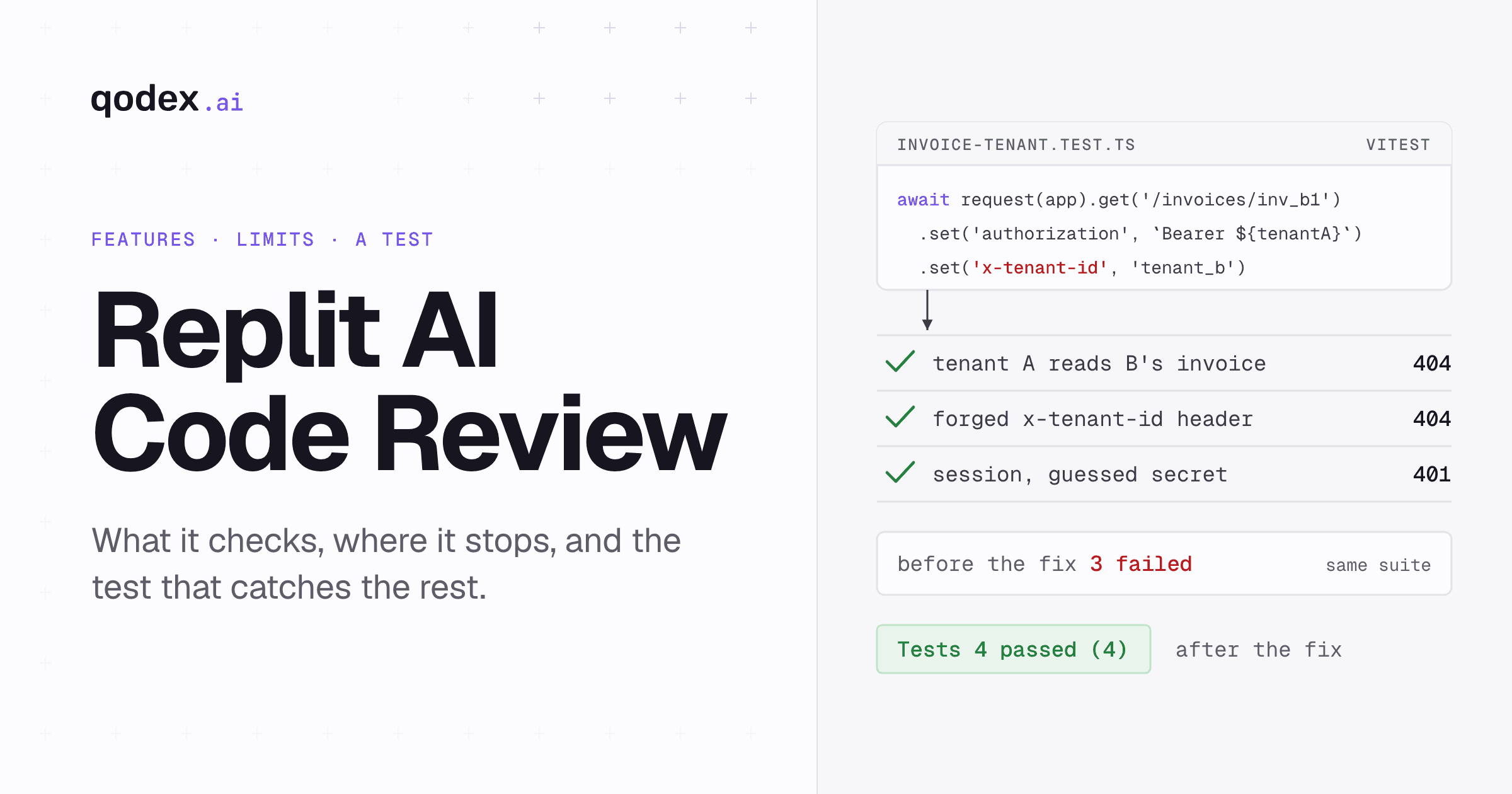
Here is invoice-tenant.test.ts. Every request carries tenant A's signed session. One reads A's own invoice, one reaches for tenant B's, and one forges an x-tenant-id header on top. The only honest answer to those two is 404. The fourth sends a session for tenant B signed with a guessed secret, and the only honest answer to that is 401.
import { describe, it, expect } from 'vitest';
import request from 'supertest';
import { createHmac } from 'node:crypto';
import { makeApp, signSession } from './invoice-app';

const tenantA = signSession('tenant_a');

describe('invoice tenant boundary', () => {
  it('tenant A reads its own invoice', async () => {
    const res = await request(makeApp())
      .get('/invoices/inv_a1?tenantId=tenant_a')
      .set('authorization', `Bearer ${tenantA}`);
    expect(res.status).toBe(200);
    expect(res.body.amount).toBe(4200);
  });

  it('tenant A cannot read tenant B invoice', async () => {
    const res = await request(makeApp())
      .get('/invoices/inv_b1?tenantId=tenant_b')
      .set('authorization', `Bearer ${tenantA}`);
    expect(res.status).toBe(404);
  });

  it('a forged x-tenant-id header changes nothing', async () => {
    const res = await request(makeApp())
      .get('/invoices/inv_b1?tenantId=tenant_b')
      .set('authorization', `Bearer ${tenantA}`)
      .set('x-tenant-id', 'tenant_b');
    expect(res.status).toBe(404);
  });

  it('a session signed with a guessed secret is rejected', async () => {
    const mac = createHmac('sha256', 'demo-only-secret').update('tenant_b').digest('hex');
    const res = await request(makeApp())
      .get('/invoices/inv_b1')
      .set('authorization', `Bearer tenant_b.${mac}`);
    expect(res.status).toBe(401);
  });
});
Run it in the Replit Shell with npm test -- invoice-tenant.test.ts. Against the generated endpoint it fails, which is the point:
FAIL  invoice-tenant.test.ts > invoice tenant boundary > tenant A cannot read tenant B invoice
AssertionError: expected 200 to be 404 // Object.is equality

FAIL  invoice-tenant.test.ts > invoice tenant boundary > a forged x-tenant-id header changes nothing
AssertionError: expected 200 to be 404 // Object.is equality

FAIL  invoice-tenant.test.ts > invoice tenant boundary > a session signed with a guessed secret is rejected
AssertionError: expected 404 to be 401 // Object.is equality

 Test Files  1 failed (1)
      Tests  3 failed | 1 passed (4)
Take the tenant from the verified session and ignore what the caller asked for. This route replaces the generated one inside makeApp; everything else in invoice-app.ts stays as printed above.
  // Fixed version: the tenant comes from the verified session, and the
  // query string and any x-tenant-id header are ignored.
  app.get('/invoices/:id', (req, res) => {
    if (!req.tenantId) return res.status(401).json({ error: 'unauthenticated' });
    const invoice = invoices.find(
      (row) => row.id === req.params.id && row.tenantId === req.tenantId
    );
    if (!invoice) return res.status(404).json({ error: 'not found' });
    res.json(invoice);
  });
Test Files 1 passed (1)
Tests 4 passed (4)Nothing on the screen changed between those two runs. A generated app can look right while an authorization boundary is wrong, and the thing that tells you is an executable negative case. Write one per boundary that matters and keep it in the repository, where it still works after the build session ends. More on the habit in how to do code reviews using AI and automated code review.
Where a dedicated pull request reviewer fits
In the build loop, the author and the reviewer are the same person, the feedback arrives inside one workspace, and the decision is whether to keep the change or roll it back. Replit covers that, and a checkpoint is the record of the decision. That is fine while one person owns the project.
In the merge loop, someone else's change is arriving in a repository you share. Three things do the work there. Feedback attached to the pull request on the lines it is about, visible to everyone. Context from the rest of the repository, because the risky part of a change can be the caller it breaks three directories away. And a status check the merge button respects, so a rule holds when nobody is watching. Replit documents importing public and private GitHub repositories and building inside the workspace, and the pages read on 19 September 2026 describe none of those three. Source: Import from a provider.
So the line is easy to draw. Build in Replit, review as you build using the steps above, and when the code leaves for a shared repository, add a reviewer that lives on the pull request. The options are compared in the best AI code review tools, and if budget is the constraint, free AI code review covers what the free tiers do.
The short version
Replit's AI code review is real and it is in-project. A plan you approve, a Code optimization toggle, browser App Testing on Power and Max, background tasks you apply or dismiss, checkpoints you roll back, and a dependency scan. Assistant is gone as of December 2025. None of it reviews a GitHub pull request, so keep executable tests for the boundaries that matter and put a reviewer on the pull request.
Frequently Asked Questions
Does Replit have AI code review?
Yes, inside the project. Agent settings include a Code optimization toggle, "Agent reviews code for bugs and improvements", alongside App Testing, plan review, background task review and checkpoints. Replit publishes no review rules, languages or finding types for that pass, and documents no review of GitHub pull requests. Source: Replit Agent, read 19 September 2026.
What code review does Replit Agent perform?
Four things. It proposes a plan with success criteria and an out of scope list before files change. It can test supported web apps in a real browser and fix what it finds. It runs background tasks in isolated copies you apply or dismiss after reading the work log and preview. It writes a checkpoint per completed request, so you can see the changes or roll back.
Is Replit Assistant still available?
No. The Replit changelog entry for Assistant carries an update dated December 2025 saying "Assistant has been deprecated." It points quick, targeted edits at Lite mode in Agent and planning discussions at Plan mode. Any guide that still tells you to use Assistant for diff previews is out of date. Source: Replit changelog, read 19 September 2026.
Does Replit Agent test every change?
No. Replit says Agent "doesn't test after 100% of user messages" and decides for itself when testing is worth doing. App Testing also needs Power Mode or Max Mode, and Free Mode keeps it off. If a test stalls on a login and you do not take over within 10 minutes, Agent continues as if it was skipped. Source: App Testing, read 19 September 2026.
Which apps work with Replit App Testing?
Replit's documentation says App Testing is available for Full Stack JavaScript and Streamlit Python web applications at this time. It documents no other stacks, so treat the browser run as unavailable outside those two. The listed scope covers user interface validation, functionality verification, integration testing, and performance and accessibility standards. Read 19 September 2026.
Can Replit review GitHub pull requests?
Not in anything Replit documents. It imports public and private GitHub repositories into a project, and review happens in the workspace after that. The documentation index on 19 September 2026 lists no page for inline pull request comments, a GitHub Check Run or branch protection. Absence from the docs is not proof that nothing exists in beta, so check before planning around it.
How much do Replit's AI review features cost?
Core is $20 a month, or $18 billed annually. Pro is $100 a month, or $90 billed annually. Enterprise is custom. There is no per review price. Paid Agent work uses effort based pricing where one checkpoint captures one completed request, App Testing is charged on the effort a test spends, and credits also pay for published apps, storage and databases. Source: Replit pricing, read 19 September 2026.